I was four hours into a session last Thursday when I noticed something I had not noticed before. My terminal had not frozen. My context window was not gasping. I had been running three separate tasks, in parallel, from the same desktop application. And none of them had collided.
Claude Code Routines is a reusable agentic workflow system that chains multiple tool calls into a predefined sequence, executing each step without requiring manual prompting. This matters because it removes the cognitive overhead of driving repetitive workflows by hand, freeing attention for higher-level decisions. Unlike full autonomous agents or rigid bash scripts, Routines define the workflow shape while leaving runtime reasoning to the agent.
That is what Claude Code Routines feel like the first time they work. Not a single dramatic feature. More like a quiet restructuring of what was possible in a given afternoon.
Anthropic shipped a comprehensive desktop overhaul for Claude Code this week. The headline feature is Routines, a research preview that lets you define reusable agentic workflows. These chain tool calls together without manual prompting at every step. But Routines are not the only thing that changed. Multi-session support, an integrated terminal, inline file editing, HTML and PDF preview, and v2.1.108's ENABLE_PROMPT_CACHING_1H flag all landed in the same window. It is a lot at once.
I have been using the research preview since it became available. Here is what I have learned so far, what actually works, and what is still rough.
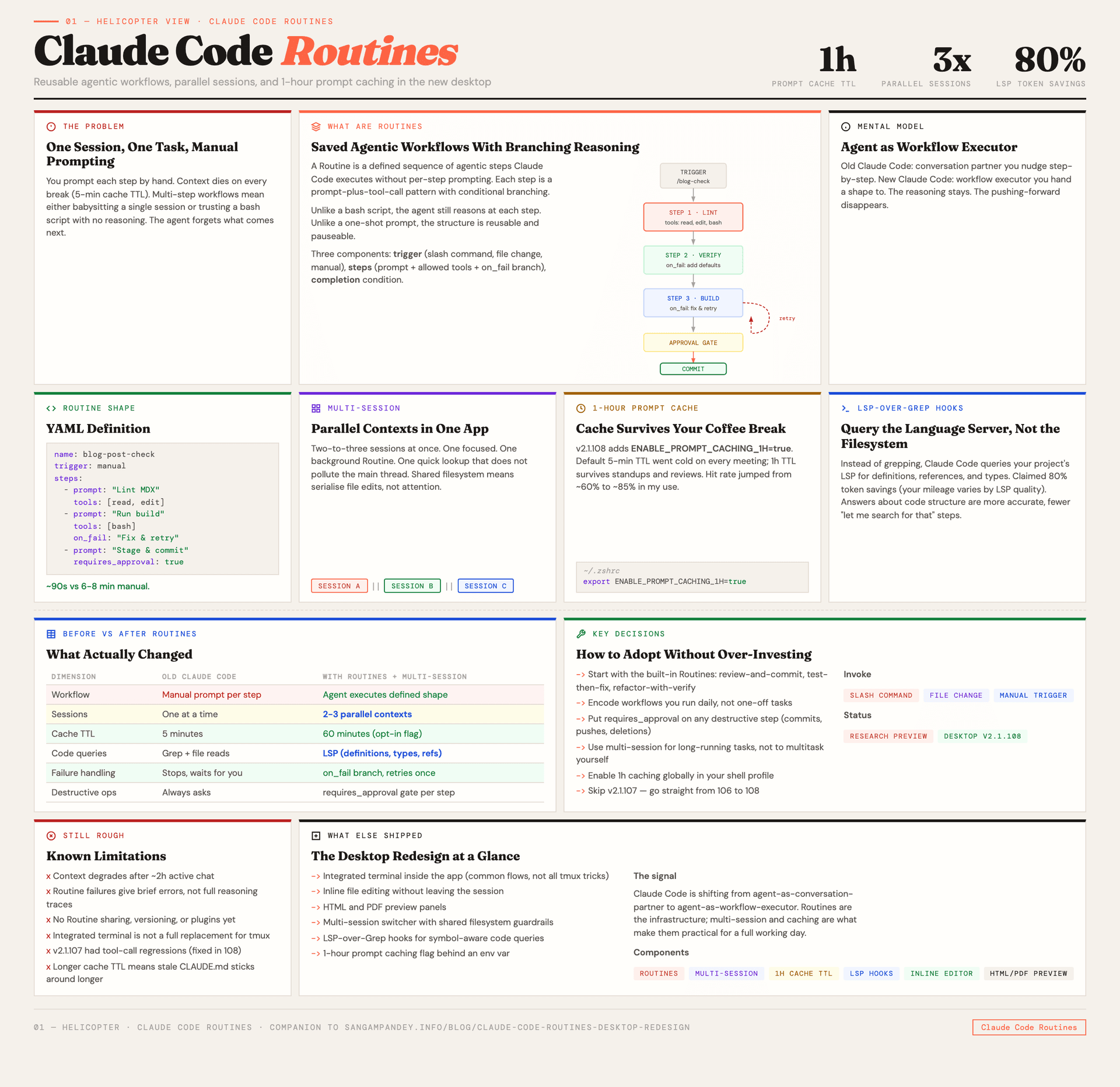
Table of Contents#
- What Claude Code Routines actually are
- Building your first Routine: a real example
- The desktop redesign beyond Routines
- Multi-session support and why it matters more than it sounds
- 1-hour prompt caching with ENABLE_PROMPT_CACHING_1H
- LSP-over-Grep hooks and the 80 percent token savings claim
- Limitations and rough edges
- What this means for agentic engineering workflows
- FAQ
What are Claude Code Routines and how do they actually work?#
If you have been building with Claude Code for a while, you know the pattern. You open a session. You give it a task. It calls some tools. You review the output. Then you give it the next task, manually, because the agent does not know what comes after.
| Approach | Who drives each step | How edge cases are handled |
|---|---|---|
| Manual prompting | Developer restarts the agent at every transition | Developer intervenes and re-prompts manually |
| Bash script | Script logic follows rigid, pre-written branching | Script fails silently or hard-exits with an error |
| Claude Code Routine | Agent reasons at each step within a defined shape | on_fail handler attempts recovery or requires_approval pauses for human input |
Routines change that. A Routine is a defined sequence of agentic steps that Claude Code can execute without you prompting each one individually. Think of it as a saved workflow, except the workflow is not a rigid script. Each step can involve tool calls, reasoning, branching based on output, and decisions about what to do next. The agent still reasons at each step. It just does not need you to push it forward.
The simplest way to think about it: Routines sit between one-shot prompts and full autonomous agents. They are more structured than "just figure it out" but less rigid than a bash script. You define the shape of the workflow. The agent fills in the details at runtime.
Here is the mental model that helped me. A Routine has three components:
- A trigger. This is how the Routine starts. It could be a slash command, a file change, or an explicit invocation.
- A chain of steps. Each step is a prompt-plus-tool-call pattern. The output of step N feeds into step N+1. Steps can branch conditionally.
- A completion condition. This is how the Routine knows it is done. It could be "all steps finished" or "a specific output was produced" or "the user approved the result."
The research preview ships with a few built-in Routines as examples. Review-and-commit. Test-then-fix. Refactor-with-verification. These are useful as starting points, but the real value is in building your own.
I want to be clear about what Routines are not. They are not multi-agent orchestration. A Routine runs within a single Claude Code session. It is one agent executing a predefined workflow, not multiple agents coordinating. If you need multiple agents working on different parts of a codebase simultaneously, that is what multi-agent systems and worktrees are for. Routines solve a different problem. They solve the problem of repetitive multi-step workflows that you currently drive by hand.
How do you build your first Claude Code Routine?#
Let me walk through an actual Routine I built this week. The use case: every time I finish a blog post draft (like this one), I need to run a sequence of checks before committing. Lint the MDX. Verify the frontmatter has all required fields. Check that internal links resolve to real posts. Run the build to confirm nothing breaks. Then stage and commit with a conventional commit message.
Before Routines, I would either do each of these manually or write a bash script that handled the deterministic parts and leave the judgment calls (like the commit message) to me. With a Routine, I can encode the whole sequence and let Claude Code handle the judgment calls too.
Here is what the Routine definition looks like in practice:
name: blog-post-check
trigger: manual
steps:
  - prompt: "Lint the MDX file at {file_path} and fix any issues"
    tools: [read, edit, bash]
  - prompt: "Verify frontmatter has title, date, description, tags, author, published fields"
    tools: [read]
    on_fail: "Add missing frontmatter fields with sensible defaults"
  - prompt: "Check that all internal /blog/ links in {file_path} resolve to files in content/blog/"
    tools: [read, glob]
  - prompt: "Run npm run build and report any errors"
    tools: [bash]
    on_fail: "Fix the build error and retry once"
  - prompt: "Stage the changed files and commit with a conventional commit message"
    tools: [bash]
    requires_approval: true
completion: "All steps passed and commit created"
The requires_approval flag on the last step is important. It means the Routine pauses before committing and asks me to confirm. I do not want fully autonomous commits. Not yet, anyway.
In practice, this Routine takes about ninety seconds to run. The same workflow done manually, with me typing each prompt and reviewing each output, takes six to eight minutes. That is not a life-changing time save on any individual run. But I do it multiple times a day, and the cognitive overhead of remembering each step is gone. I just invoke the Routine and check the final output.
The branching behavior on failure steps is where it gets interesting. When the build fails, the Routine does not just stop and report an error. It attempts to fix the problem and retry. This works well for straightforward issues like a missing import or a type error. It works poorly for complex architectural problems. But that matches my expectations. I would not trust an autonomous agent to fix a hard build error without my input anyway.
What does the Claude Code desktop redesign include beyond Routines?#
Routines get the attention, but the desktop redesign includes several other changes that affect daily work.
Integrated terminal. Claude Code now has a proper terminal built into the desktop application. This sounds minor. It is not. Previously, Claude Code's desktop experience was layered on top of your system terminal. The new integrated terminal means Claude Code controls the rendering, the scrollback, the font, and the layout. It means tool outputs render inline without the jank that came from piping structured output through a terminal emulator not designed for it.
Inline file editing. You can now view and edit files directly within the Claude Code interface. This is not a full IDE. It is closer to a quick-edit pane. But it means you do not need to switch to VS Code or Neovim to make a small change mid-conversation. For the kind of light edits that happen during an agentic workflow, reviewing a generated file and tweaking a line or two, this is a meaningful friction reduction.
HTML and PDF preview. If Claude Code generates an HTML file or processes a PDF, you can preview it inline. I have used this exactly twice so far, both times when generating documentation. It is nice to have, though I suspect its value will become clearer as Routines that generate reports or dashboards become more common.
Improved file tree. The sidebar now shows a navigable file tree for the current project. This was the one feature I kept wishing for in the previous version. When an agent references a file, you can click to it immediately instead of asking the agent to show you what is there.
The overall feel of the redesign is closer to Cursor or Windsurf than to the old terminal-native Claude Code. That will be divisive. Some people chose Claude Code specifically because it was a terminal tool. Others wanted the power of Claude Code with the convenience of a desktop application. Anthropic is clearly betting on the second group being larger, while keeping the terminal interface available for the first.
Why does multi-session support matter more than it sounds?#
This is the feature I underestimated the most.
Previously, Claude Code was one session at a time. One conversation. One context window. One task. If you wanted to do something else, you either started a new instance or you interrupted your current work. I wrote about the coordination problems this creates in my piece on running multiple Claude agents. The workaround was git worktrees plus multiple terminal windows. It worked, but it required discipline and setup.
Multi-session support changes the default. You can now run multiple Claude Code sessions in parallel within the same desktop application. Each session has its own context window, its own conversation history, and its own set of active tools. They share the same filesystem, which means you still need to be careful about concurrent file edits. But the session management is handled for you.
In practice, I have been running two to three sessions simultaneously. One for the main task I am focused on. One for a background Routine (like running tests or monitoring a deployment). And occasionally a third for quick lookups or explorations that I do not want polluting my main context.
The key insight is that multi-session support and Routines compound. A Routine running in a background session can complete its entire workflow without interrupting whatever you are doing in your primary session. This is genuinely new. Before, running a multi-step workflow meant either watching it happen (occupying your attention) or trusting it to run unattended in a separate terminal (occupying your anxiety). Now it runs in a visible but non-blocking session. You can glance at it whenever you want. It notifies you when it finishes or needs approval.
This pattern, background Routines in secondary sessions, is going to become a standard part of how people work with Claude Code. I am already treating it as default.
How does ENABLE_PROMPT_CACHING_1H change prompt caching?#
The v2.1.108 release includes a new environment variable: ENABLE_PROMPT_CACHING_1H. Set it to true and your prompt cache gets a one-hour TTL instead of the default five-minute window.
If you have read my series on prompt caching architecture, you know why this matters. The default five-minute TTL means your cache goes cold whenever you step away from your desk, take a meeting, or context-switch to a different project for more than a few minutes. When you come back, the first request pays the full cache creation cost again. For projects with large system prompts or extensive CLAUDE.md files, that cost is not trivial.
A one-hour TTL changes the math. Your cache survives a coffee break. It survives a standup. It survives the twenty minutes you spend reviewing a PR in the browser before coming back to your Claude Code session. In my testing over the past few days, the hit rate improvement is significant. I went from roughly 60% cache hits across a working day to closer to 85%.
The cost implication is straightforward. Cached input tokens cost a fraction of uncached ones. If your sessions involve long system prompts (and if you are using CLAUDE.md plus skills files plus hooks, they do), the savings compound quickly. I do not have exact numbers yet because the billing dashboard does not break it down by cache TTL. But the token consumption metrics in the session logs show a clear reduction.
There is a trade-off. A longer TTL means stale cache entries stick around longer. If you update your CLAUDE.md or change a skill file mid-session, the cache will continue serving the old version until the TTL expires or the prefix hash changes. In practice, this has not been a problem for me because I rarely change configuration files mid-session. But it is worth knowing.
To enable it:
export ENABLE_PROMPT_CACHING_1H=true
Add it to your shell profile and forget about it. I have not found a reason to leave it off.
Do LSP-over-Grep hooks actually deliver 80 percent token savings?#
This one requires some context. When Claude Code needs to understand your codebase, it typically uses grep and file reads. It searches for patterns, reads relevant files, and builds up an understanding of the code structure. This works, but it is token-expensive. Every file read consumes input tokens. Every grep result that turns out to be irrelevant was wasted context.
LSP-over-Grep hooks take a different approach. Instead of grepping through files, Claude Code queries your project's Language Server Protocol implementation. The LSP already knows your code structure. It knows where symbols are defined, where they are referenced, what types they have, and how they relate to each other. Querying the LSP for "where is this function defined" is dramatically more efficient than grepping for the function name across the entire codebase.
The 80% token savings claim comes from Anthropic's internal benchmarks. I am skeptical of that number as a universal claim. It depends heavily on the codebase size, the quality of the LSP implementation, and the types of questions being asked. For a large TypeScript project with a well-configured tsserver, I can believe it. For a Python project with a basic Pyright setup, the savings will be smaller.
In my own testing with this Next.js project, the token reduction on code navigation tasks has been noticeable but hard to quantify precisely. The agent makes fewer file reads and produces more targeted edits. Whether that translates to exactly 80% savings, I cannot say. What I can say is that the agent's answers about code structure are more accurate when the LSP hooks are active. It finds definitions faster, understands type relationships better, and produces fewer "let me search for that" intermediate steps.
The setup is straightforward if your editor already has LSP configured. Claude Code detects the running language server and hooks into it. If you are using VS Code or Neovim with LSP, it should work without additional configuration. If your project does not have LSP configured, these hooks will not help you.
What are the current limitations and rough edges of Claude Code Routines?#
I do not want to oversell this. The desktop redesign is a real step forward, but several things are still rough.
Context window degradation on long sessions. This is the biggest issue. Community reports from v2.1.107 flagged degradation in response quality as sessions get long. I have experienced this too. After about two hours of active conversation, the agent starts repeating itself, missing context from earlier in the conversation, and making errors it would not have made at the start. Multi-session support helps because you can start fresh sessions more easily. But the underlying problem, that very long conversations degrade quality, is not solved by the desktop redesign.
Routine debugging is painful. When a Routine fails partway through, the error reporting is minimal. You get a message that step N failed and a brief error description. You do not get the full reasoning trace for why the agent made the decision it did at that step. For simple Routines this is fine. For complex ones with branching logic, debugging a failure means manually reconstructing what the agent was thinking. I expect this to improve as Routines move out of research preview, but right now it is a real limitation.
No Routine sharing or versioning. Routines are local to your machine. There is no way to share them with a team, version them in git (at least not with any official workflow), or publish them as part of a plugin. This feels like an obvious gap that Anthropic will fill eventually, but for now each developer builds their own Routines in isolation.
The integrated terminal is not a full terminal. It handles common workflows well. But if you rely on tmux, specific shell configurations, or unusual terminal features, you will still want your system terminal. The integrated terminal is a convenience layer, not a replacement.
v2.1.107 regression reports. The community has flagged that v2.1.107 introduced some regressions, particularly around tool call reliability and context handling. v2.1.108 addresses some of these, but not all. If you are upgrading from an older version, be aware that the path has not been entirely smooth. I would recommend going straight to v2.1.108 and skipping 107 if possible.
How do Routines reshape agentic engineering workflows?#
Let me step back and think about what this release signals for how we build with AI coding agents.
The pattern I see forming is this: we are moving from "agent as conversation partner" to "agent as workflow executor." The early days of Claude Code were about having a conversation with an AI that could read and write files. Routines shift the paradigm toward defining workflows that the agent executes semi-autonomously.
This is similar to the evolution I described in my piece on agentic workflow patterns. The nine patterns in that post describe different ways to structure agent behavior. Routines give you a practical mechanism for implementing several of those patterns, particularly prompt chaining and orchestrator-worker, without building custom infrastructure.
The combination of Routines plus multi-session support plus improved caching creates a new baseline for what a single developer can accomplish in a day. I do not mean that in a hand-wavy "10x developer" way. I mean specifically: tasks that previously required sequential attention can now run in parallel. Tasks that required manual prompting at each step can now run as Routines. And tasks that required re-establishing context after every break are now cached for an hour.
Whether this matters to you depends on what you build. If you write code in focused thirty-minute sessions with clear tasks, the old Claude Code was probably fine. If you spend your days on complex, multi-step workflows that span hours and involve repetitive sub-tasks, this release is a significant upgrade.
The broader context is worth noting too. Microsoft is proposing AI agent software licenses, which suggests the industry is moving toward treating agent-generated code as a distinct category. Anthropic may release Opus 4.7 this week, which would affect the reasoning capabilities underlying everything discussed here. And the engagement numbers on this release, 156K+ interactions across five platforms, suggest that the developer community is paying close attention.
I think the right way to think about Routines is not as a finished product but as infrastructure for a future that is arriving faster than most people expect. The research preview label is honest. This is early. But the direction is clear, and if you are building with Claude Code daily, it is worth learning now.
FAQ#
What are Claude Code Routines and how do they differ from regular prompts?#
Claude Code Routines are reusable agentic workflows that chain multiple tool calls together without requiring manual prompting at each step. Unlike regular prompts where you guide the agent through each action one at a time, a Routine defines a sequence of steps that the agent executes semi-autonomously. Each step can involve tool calls, reasoning, and conditional branching. The agent still thinks at each step, but you do not need to push it forward manually.
Do I need the desktop application to use Routines?#
The research preview of Routines is currently available through the Claude Code desktop application. It is possible that Routines will come to the terminal-native version as well, but as of v2.1.108, the desktop redesign is where the full feature set lives. You can still use Claude Code in your regular terminal for everything else.
How does ENABLE_PROMPT_CACHING_1H affect my costs?#
Setting ENABLE_PROMPT_CACHING_1H=true extends the prompt cache TTL from five minutes to one hour. This means your cached system prompts and context survive longer between interactions, resulting in fewer cache rebuilds and lower token costs. Cached input tokens cost significantly less than uncached ones. The exact savings depend on your system prompt size and how frequently you interact with the agent, but I observed a jump from roughly 60% to 85% cache hit rates across a working day.
Can I share Routines with my team?#
Not through any official mechanism yet. Routines are stored locally on your machine. You could manually copy the Routine definition files and share them through your own version control, but there is no built-in sharing, publishing, or team synchronization feature. This is a known gap in the research preview.
What happens when a Routine fails partway through?#
The Routine stops at the failed step and reports a brief error. If you have defined an on_fail handler for that step, the agent will attempt the recovery action before giving up. If no handler is defined, the Routine halts and you need to intervene manually. The debugging experience is still limited. You do not get a full reasoning trace, which makes diagnosing failures in complex Routines harder than it should be.
Are Routines safe to run unattended?#
That depends on what the Routine does. For read-only workflows like linting, testing, and analysis, running unattended is relatively low risk. For workflows that write files, make commits, or interact with external services, I would recommend using the requires_approval flag on any step that has side effects. The research preview does not have built-in sandboxing for Routines, so the agent has the same filesystem access it always does.
How does multi-session support interact with Routines?#
Each session has its own independent context window and conversation. You can run a Routine in one session while working interactively in another. The sessions share the same filesystem, which means you need to be careful about concurrent edits to the same files. But the combination is powerful. You can kick off a long-running Routine in a background session and continue your primary work without interruption. The session will notify you when the Routine completes or needs approval.