My last post covered what Brad Abrams said at Code w/ Claude about context window engineering. A few people asked the obvious follow-up: okay, but how do you actually build this?
Context window engineering is the practice of deliberately designing how information enters, persists, and exits the context window of a large language model in production systems. It determines the cost, speed, and reliability of every agent turn, making it an architectural decision rather than a prompt tweak. Unlike prompt engineering, which shapes what you say to a model, context window engineering governs how much the model actually processes on each turn.
That is what this post is for.
I spent time going deep on the actual API mechanics, SDK calls, and production gotchas for each of the five techniques Brad described. This context window engineering implementation guide covers all five, in the order I would ship them, with the mistakes I actually made along the way.
A note on my take before we start: most of the pain I have seen in production agents is not a model problem. It is an architecture problem. The techniques here are not optimizations you bolt on later. They are decisions you make when you design how context flows through your system. Get them right early and the rest gets easier.
Table of Contents#
- Technique 1: Prompt caching
- Technique 2: Tool search and deferred loading
- Technique 3: Programmatic tool calling
- Technique 4: Compaction
- Technique 5: The advisor strategy
- Production gotchas that will bite you
- Where to start
- FAQ
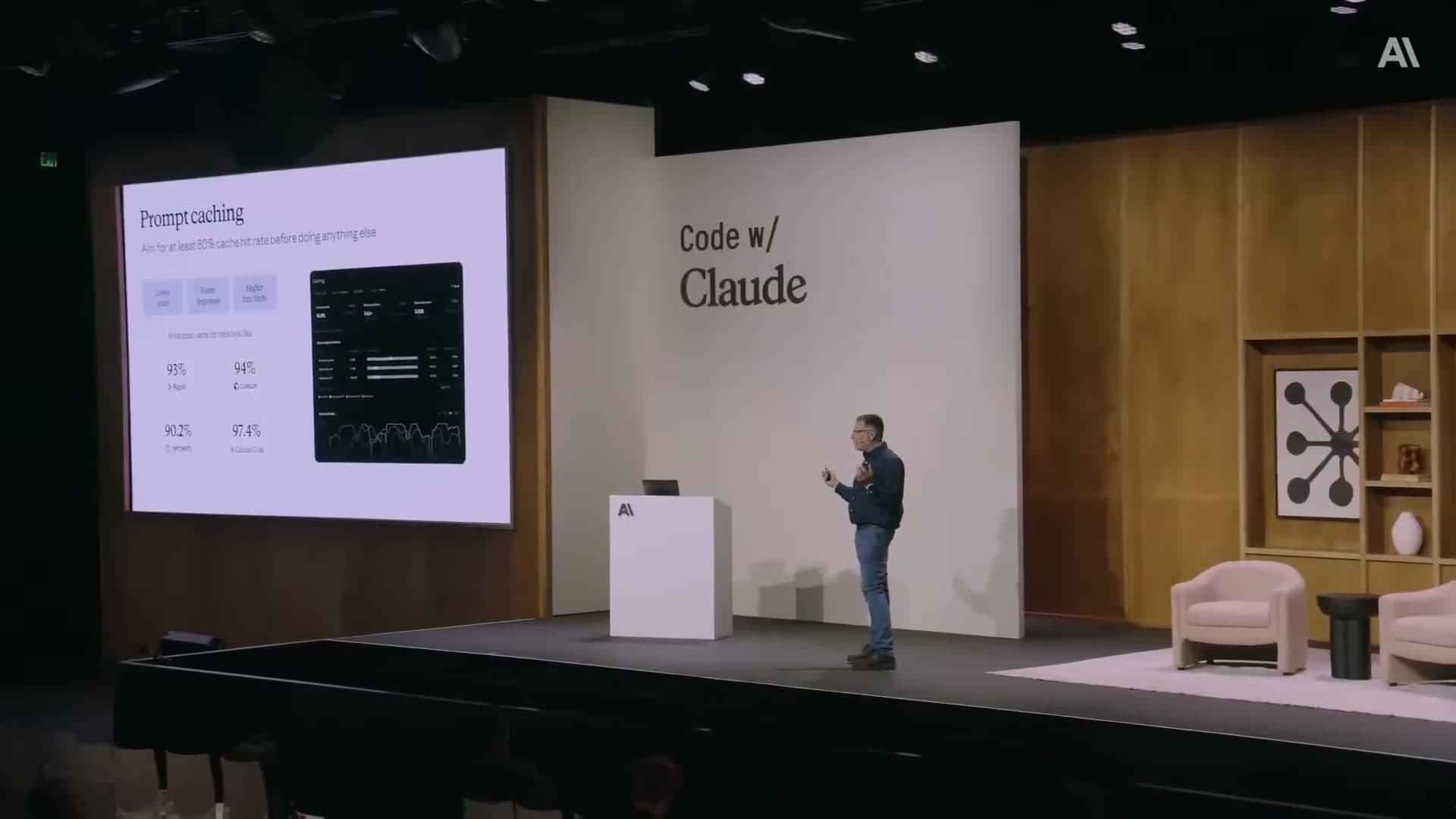
How does prompt caching reduce token costs in production?#
Prompt caching is a server-side feature. Anthropic's API computes a hash of your prompt prefix, and if it finds a match in cache from a recent request, it reuses the cached portion. You only pay full input token prices for the new dynamic content.
The default TTL is 5 minutes. A 1-hour TTL option exists for slower sessions (like long-running chats) but costs more to write and read. The billing breakdown: cache writes are ~1.25x the base input price, cache reads are ~0.1x. Once you have a high hit rate, this is where the 90% discount figure comes from.
Where to place breakpoints#
You control caching by adding cache_control breakpoints to your prompt. The breakpoint goes on the last content block of your stable prefix. Everything up to and including that block gets cached.
import anthropic

client = anthropic.Anthropic()

response = client.messages.create(
    model="claude-sonnet-4-6",
    max_tokens=1024,
    system=[
        {
            "type": "text",
            "text": "You are an expert financial analyst with access to company data tools.",
        },
        {
            "type": "text",
            # All your expensive tool descriptions and background context go here
            "text": "<your static tool descriptions and background context>",
            "cache_control": {"type": "ephemeral"}  # Cache everything above this
        }
    ],
    messages=[
        {"role": "user", "content": user_message}  # Only dynamic part is fresh
    ]
)

print(response.usage.cache_read_input_tokens)    # Tokens served from cache
print(response.usage.cache_creation_input_tokens) # Tokens written to cache
The usage object in every response tells you exactly what happened. Watch cache_read_input_tokens versus cache_creation_input_tokens to know your actual hit rate.
Pre-warming the cache#
Do not wait for the first real user request to populate the cache. Pre-warm it at deploy time by sending a request with max_tokens=0. The API runs the prefill, writes to cache, and returns immediately without generating output.
# Run this in your deployment script, or on a cron every 4 minutes
prewarm = client.messages.create(
    model="claude-sonnet-4-6",
    max_tokens=0,  # No output generated — just warms the cache
    messages=[
        {
            "role": "user",
            "content": [
                {
                    "type": "text",
                    "text": "<your full static prefix here>",
                    "cache_control": {"type": "ephemeral"}
                },
                {
                    "type": "text",
                    "text": "warmup"  # Throwaway dynamic content
                }
            ]
        }
    ]
)

print(prewarm.stop_reason)  # "max_tokens" — expected
print(prewarm.usage.cache_creation_input_tokens)  # Confirms the write happened
My take here: this one step alone moved the needle more than any prompt tuning I had done. Running it on a schedule every 4 minutes (just under the 5-minute TTL) keeps the cache hot continuously.
How does tool search and deferred loading minimize context bloat?#
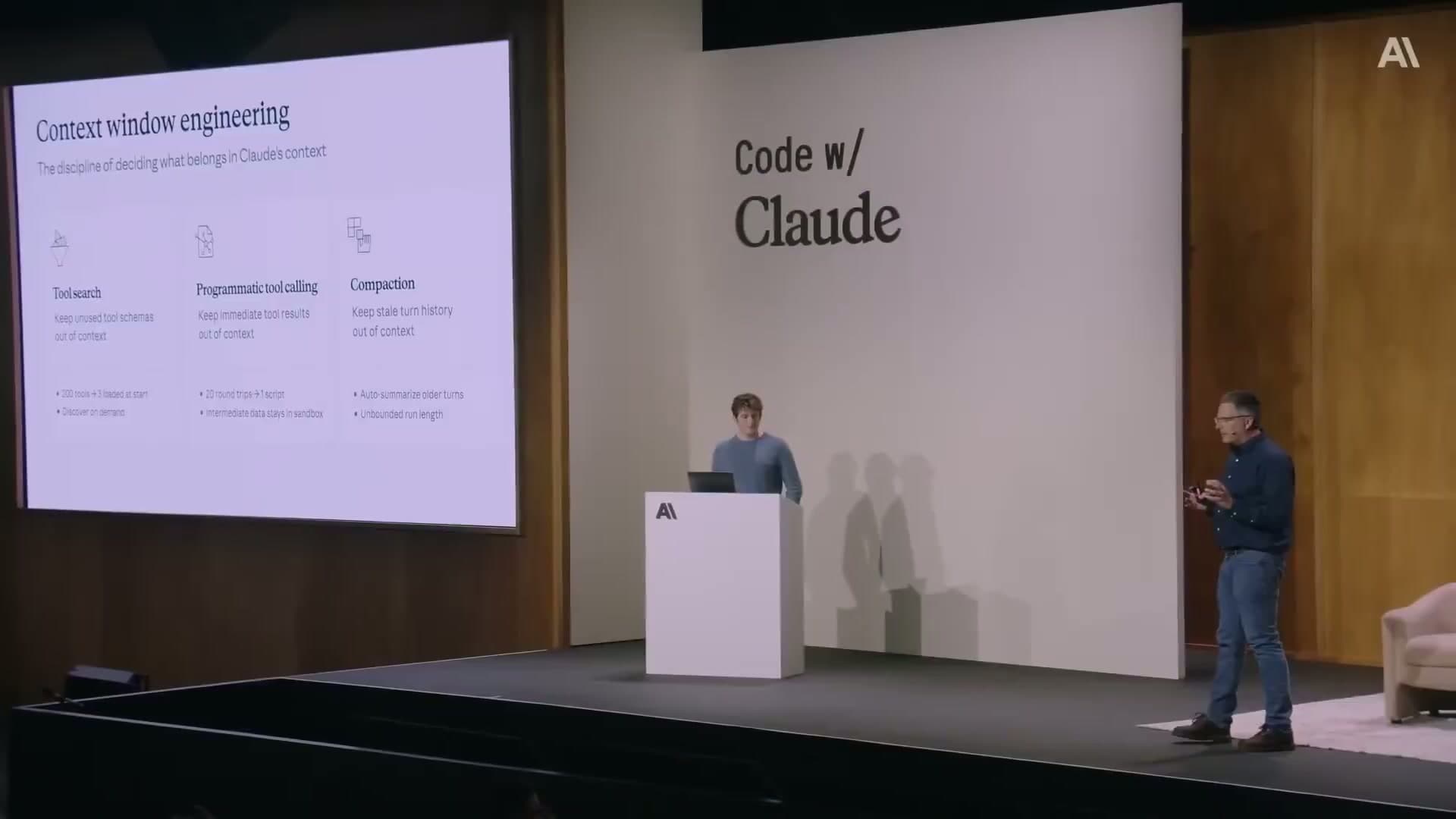
If you have more than 10-15 tools, loading all their schemas upfront is wasteful. Most agents use 3-5 tools on any given turn. The rest just add noise and tokens.
The deferred loading pattern works like this: your agent starts with only a tool_search tool in its context. When it needs a capability, it calls tool_search with a natural language query. Your backend does a semantic search over the tool registry, returns the relevant tool definitions, and the agent proceeds.
The tool registry#
Build a tool registry that stores each tool with a pre-computed embedding of its description.
from sentence_transformers import SentenceTransformer
import numpy as np

model = SentenceTransformer('all-MiniLM-L6-v2')

tool_registry = {
    "github_create_pr": {
        "name": "github_create_pr",
        "description": "Create a GitHub pull request with title, body, base branch, and head branch",
        "input_schema": { ... },  # Full JSON Schema
        "embedding": model.encode(
            "Create GitHub pull request repository code review merge branch"
        )
    },
    "bigquery_run_query": {
        "name": "bigquery_run_query",
        "description": "Execute a SQL query against BigQuery and return results as JSON",
        "input_schema": { ... },
        "embedding": model.encode(
            "BigQuery SQL database query analytics data warehouse"
        )
    },
    # ... hundreds more tools
}

def search_tools(query: str, top_k: int = 5):
    query_embedding = model.encode(query)
    scores = {}
    for tool_id, tool in tool_registry.items():
        similarity = np.dot(query_embedding, tool["embedding"])
        scores[tool_id] = similarity
    return sorted(scores, key=scores.get, reverse=True)[:top_k]
The agent prompt#
The agent only sees the tool_search tool at start. All others are marked deferred.
tools = [
    {
        "name": "tool_search",
        "description": "Search for available tools by describing the capability you need.",
        "input_schema": {
            "type": "object",
            "properties": {
                "query": {"type": "string", "description": "Natural language description of the capability you need"}
            },
            "required": ["query"]
        }
    }
]

# In your tool use handler:
def handle_tool_call(tool_name, tool_input):
    if tool_name == "tool_search":
        matching_ids = search_tools(tool_input["query"])
        # Return the full tool definitions for the matching tools
        # These get appended to the conversation, not to the initial prefix
        # So your cached prefix stays untouched
        return [tool_registry[tid] for tid in matching_ids]
The key insight: discovered tools get added to the conversation history, not the system prompt. Your original cached prefix stays intact. Every tool discovery call leaves the cache valid.
Pre-approving trusted tools#
One production problem: tool_search can trigger a confirmation prompt that breaks autonomous workflows. Pre-approve trusted tools in your agent configuration so they bypass the confirmation flow entirely.
{
  "allowed_tools": [
    "github_*",
    "bigquery_run_query",
    "internal_api_*"
  ],
  "denied_tools": [
    "github_delete_repo",
    "bigquery_drop_table"
  ]
}
Wildcards work. The deny list overrides the allow list. Set this up before you start seeing agents stuck waiting for human approval in the middle of a run.
How does programmatic tool calling keep intermediate data out of the context window?#
This is the pattern where Claude writes Python code to process tool outputs, rather than having raw tool results dumped directly into the context.
The flow: Claude generates a Python script that calls your tools as functions. That script runs in a sandboxed container. Each tool call within the script pauses execution, sends the tool request to your host application, gets the result back, and then the script continues. Only the final output of the script enters the model's context.
The token savings are significant. Anthropic's internal benchmarks show a 37% reduction in average token usage for complex multi-step tasks, because all the intermediate fetching and filtering happens inside the sandbox, not in the context window.
What your host handler looks like#
import anthropic

client = anthropic.Anthropic()

tools = [
    {
        "name": "get_expenses",
        "description": "Get expense records for a user",
        "input_schema": {
            "type": "object",
            "properties": {
                "user_id": {"type": "string"},
                "date_range": {"type": "string"}
            }
        },
        # Critical: this allows the tool to be called from inside the sandbox
        "allowed_callers": ["code_execution_20260120"]
    }
]

messages = [{"role": "user", "content": "Summarize the Q1 expenses for user u_789"}]

while True:
    response = client.beta.messages.create(
        betas=["code-execution-20260120"],
        model="claude-sonnet-4-6",
        max_tokens=4096,
        tools=tools,
        messages=messages
    )

    if response.stop_reason == "tool_use":
        tool_results = []
        for block in response.content:
            if block.type == "tool_use":
                # Execute the tool in your application
                if block.name == "get_expenses":
                    result = fetch_expenses(block.input["user_id"], block.input["date_range"])
                    tool_results.append({
                        "type": "tool_result",
                        "tool_use_id": block.id,
                        "content": result
                    })

        messages.append({"role": "assistant", "content": response.content})
        messages.append({"role": "user", "content": tool_results})

    elif response.stop_reason == "end_turn":
        # Only the final, filtered output is here — not all the intermediate data
        print(response.content)
        break
One thing I want to flag: the allowed_callers field on the tool definition is not optional. Without it, tools are not callable from inside the code execution sandbox. This tripped me up when I first implemented this.
Parallel tool calls inside the sandbox#
Claude can issue concurrent tool calls by writing async Python code. This matters for workloads that need to pull data from multiple sources before doing something useful with it.
# Claude generates code like this inside the sandbox:
import asyncio

async def gather_data():
    results = await asyncio.gather(
        get_user_profile(user_id="u_789"),
        get_expenses(user_id="u_789", date_range="Q1-2026"),
        get_budget_targets(department="engineering")
    )
    # Filter and combine — only the summary goes back to context
    return {
        "over_budget_categories": [...],
        "total_spend": ...,
        "variance": ...
    }
The sandbox handles the async execution. All three requests run in parallel. Only the combined summary returns to the model's context window.
How does compaction handle context overflow in long-running agents?#
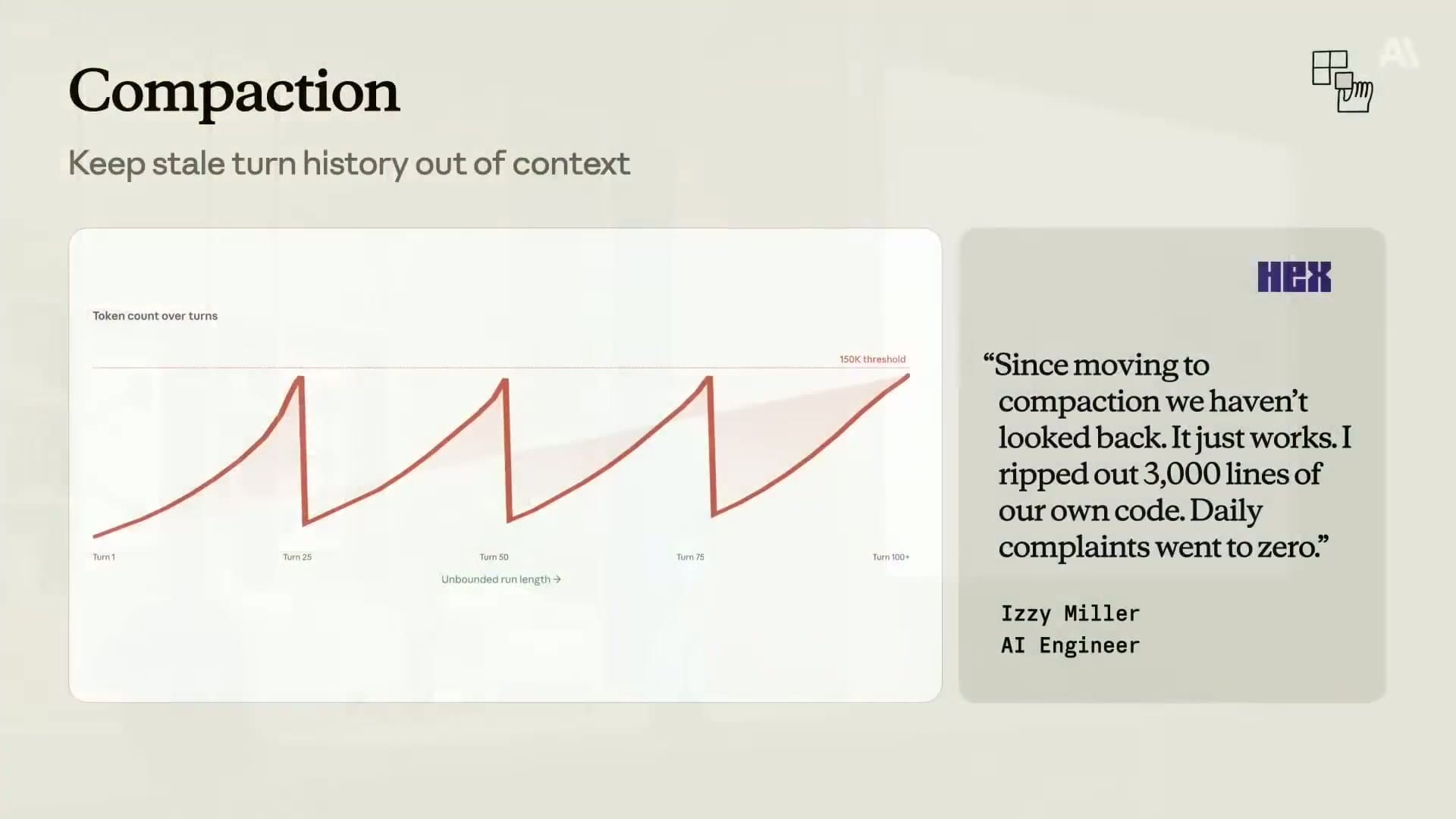
Compaction is the fix for long-running agents that accumulate too much history. The API automatically summarizes older conversation turns when a token threshold is hit, replacing them with a compact summary block.
It is currently in beta for Claude Opus 4.7, Opus 4.6, and Sonnet 4.6.
Enabling compaction#
import anthropic

client = anthropic.Anthropic()

messages = [{"role": "user", "content": "Start of a long task..."}]

response = client.beta.messages.create(
    betas=["compact-2026-01-12"],
    model="claude-opus-4-7",
    max_tokens=4096,
    messages=messages,
    context_management={
        "edits": [
            {
                "type": "compact_20260112",
                "trigger": {
                    "type": "input_tokens",
                    "value": 100000  # Compact when context hits 100k tokens
                },
                "pause_after_compaction": True,  # Pause so we can inspect the summary
                "instructions": """Summarize this conversation session.

Preserve under dedicated headings:
- OPEN_TASKS: Any incomplete tasks or pending actions
- KEY_DECISIONS: Decisions made and their rationale
- CRITICAL_STATE: File paths, repository names, API endpoints, schema definitions
- USER_CONSTRAINTS: Any explicit requirements or constraints the user stated

Do not lose any of these. The agent must be able to continue without re-asking."""
            }
        ]
    }
)

# Handle compaction
if response.stop_reason == "compaction":
    print("Compaction occurred — context summarized")
    # The compaction block is in response.content
    # Append it to messages and continue
    messages.append({"role": "assistant", "content": response.content})
    # Now continue with the next user turn
What gets lost without a good instructions prompt#
The most common failure mode with compaction: agents forgetting user constraints mid-session. I ran into this building a long-running document processing agent — after a compaction event, the agent stopped respecting a specific output format the user had specified at the start of the session. The default summarizer had compressed "use ISO 8601 dates throughout" into nothing. The default summarizer does not know what matters to your specific use case. It will compress a database schema down to "the agent discussed a database" if you do not tell it to preserve the schema.
Use the instructions parameter. Be explicit about what is critical. The pattern that works is named sections with PRESERVE semantics, so the model knows these are not candidates for compression.
How does the advisor strategy balance cost and reasoning quality?#
The advisor pattern pairs Sonnet as the primary executor with Opus as an on-demand advisor. Sonnet handles most of the work. When it hits a decision point that needs deeper reasoning, it calls the advisor. Opus returns a structured plan. Sonnet executes the plan.
From the client's perspective, this is a single API call. The sub-inference to Opus happens server-side.
TypeScript implementation#
import Anthropic from '@anthropic-ai/sdk';

const client = new Anthropic();

async function runAgentWithAdvisor(userRequest: string) {
  const messages = [
    { role: 'user', content: userRequest }
  ];

  const response = await client.beta.messages.create({
    betas: ['advisor-tool-2026-03-01'],
    model: 'claude-sonnet-4-6',  // Executor: fast and cheap for most turns
    max_tokens: 4096,
    messages,
    tools: [
      // Your regular tools here
      {
        name: 'run_query',
        description: 'Execute a database query',
        input_schema: { ... }
      },
      // The advisor tool: this is the escalation mechanism
      {
        name: 'advisor',
        description: 'Consult a senior advisor for complex decisions, architectural choices, or high-risk actions.',
        input_schema: { type: 'object', properties: {} },
        // Only enable advisor-side caching if you expect 3+ calls per session
        // The cache write cost is not worth it for fewer calls
        caching: { type: 'ephemeral', ttl: '5m' }
      }
    ]
  });

  // The response usage.iterations[] breaks down costs per model
  // Top-level usage only shows executor (Sonnet) tokens
  console.log('Executor tokens:', response.usage.input_tokens);
  console.log('Full cost breakdown:', response.usage.iterations);

  return response;
}
Python implementation with cost cap#
The advisor has no built-in frequency limit. Without a client-side cap, an executor that escalates too aggressively will burn through Opus tokens quickly.
MAX_ADVISOR_CALLS = 3  # Cap per session

advisor_call_count = 0

def handle_response(response, messages):
    global advisor_call_count

    for block in response.content:
        if block.type == "tool_use" and block.name == "advisor":
            if advisor_call_count >= MAX_ADVISOR_CALLS:
                # Return a stub response instead of calling the advisor
                messages.append({
                    "role": "user",
                    "content": [{
                        "type": "tool_result",
                        "tool_use_id": block.id,
                        "content": "Advisor budget exhausted. Proceed with your best judgment."
                    }]
                })
            else:
                advisor_call_count += 1
                # Let the API handle the sub-inference normally
                messages.append({
                    "role": "assistant",
                    "content": response.content
                })
    return messages
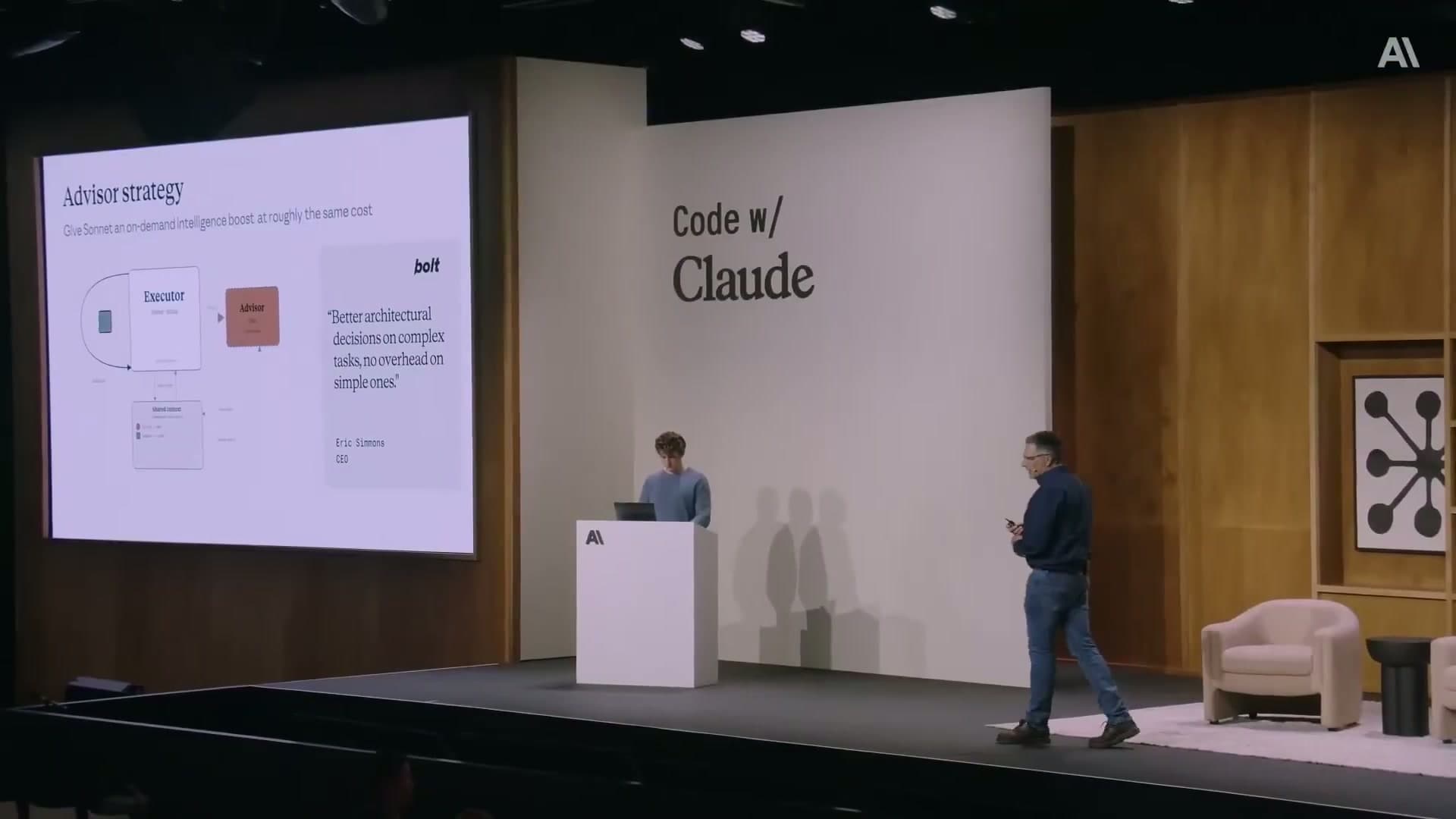
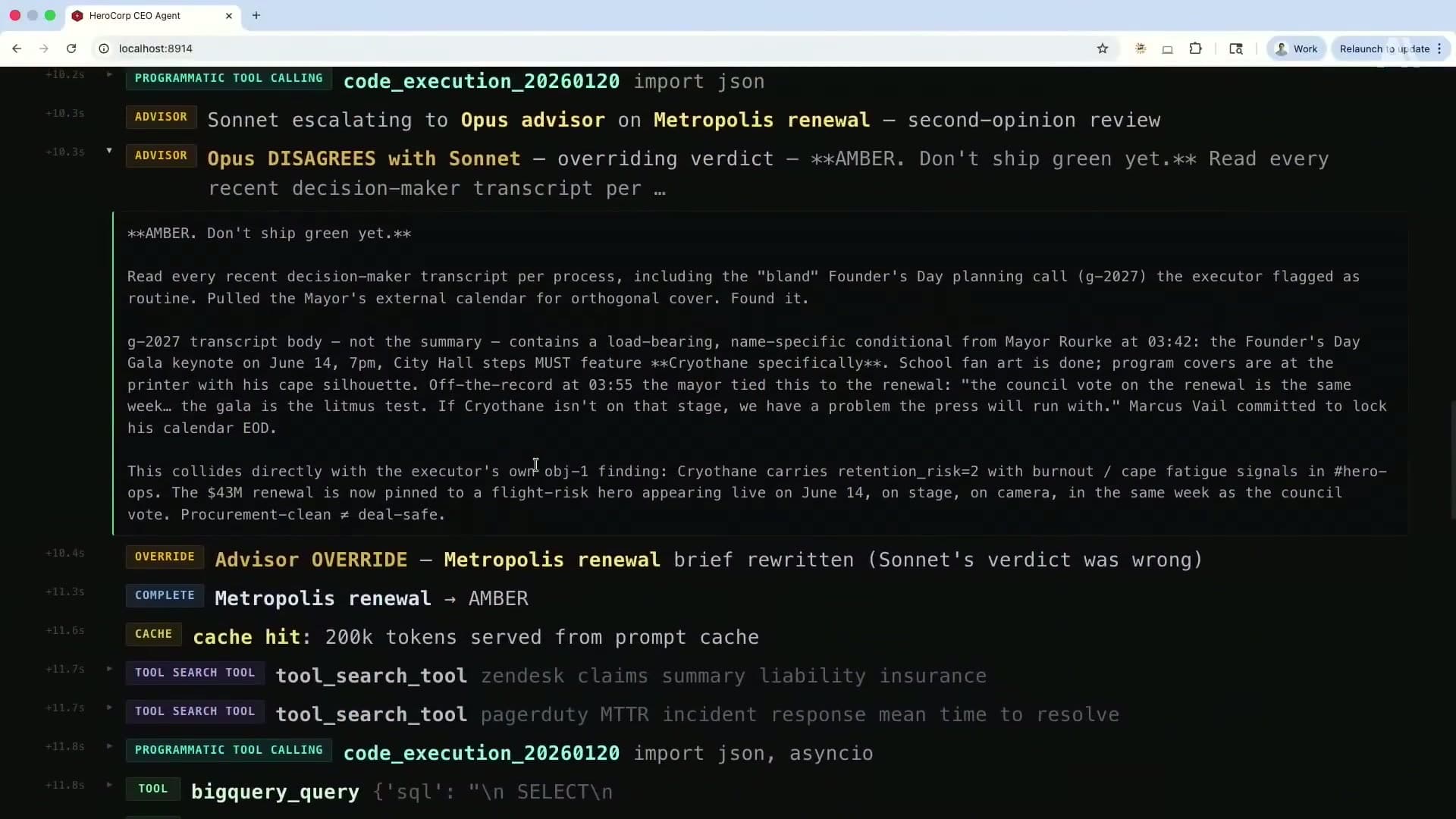
My take on the advisor pattern: the routing logic is the hard part. You need the executor to have a reliable internal sense of when to escalate. I have had better results giving the executor an explicit escalation rubric in the system prompt rather than leaving it to figure out on its own.
Something like: "Call the advisor when you are about to take an irreversible action, when you are uncertain between two significantly different approaches, or when the task requires reasoning about constraints you have not seen before."
What production gotchas will bite you with context window engineering?#
These are the ones that cost me time or money before I understood them. None of them are obvious from reading the docs.
Thinking block invalidation. On older Opus/Sonnet models and all Haiku models, adding a non-tool-result user message to a conversation invalidates the cache and strips all prior thinking blocks. I hit this when migrating an agent from Haiku to Sonnet — the extended thinking outputs that worked in development disappeared silently in production because the model version handled cache invalidation differently. On Sonnet 4.6 and Opus 4.5+, thinking blocks are preserved by default. Test caching behavior with the exact model version you intend to ship, not just the latest one.
Tool definition changes invalidate the entire prefix cache. Any change to a tool's name, description, or parameter schema changes the prefix hash. Treat tool definitions as versioned artifacts. When you ship a change, run the pre-warm script immediately as part of deployment to repopulate the cache.
Code execution containers expire. Sandboxes in programmatic tool calling have a finite lifecycle shown in an expires_at field. If your host application is slow to return tool results, the container can expire mid-run. Monitor this. Build your orchestration loop to submit tool_result blocks well within the container TTL.
Compaction forgets what you do not tell it to remember. The default summarization is not aware of what is critical to your agent. Pass a custom instructions string to the compaction config. Name the things you cannot afford to lose. This is not optional for production use.
Advisor calls are unbounded by default. Implement a session-level cap from day one. I would set it low (2-3) and raise it only if you see the pattern actually earning its cost in decision quality.
Where should you start implementing context window engineering?#
If I were starting fresh today, here is the order I would implement these:
| Technique | Trigger Threshold | Primary Token Impact |
|---|---|---|
| Prompt caching | Any agent with a static system prompt | Up to 90% discount on cached tokens; reads cost 0.1x base price |
| Tool search and deferred loading | More than 15 tools in your registry | Removes unused tool schemas from every request |
| Compaction | Agents running 50 or more turns or exceeding 100k tokens | Replaces accumulated conversation history with a compact summary |
-
Prompt caching first. Add
cache_controlbreakpoints to your system prompt and static tool definitions. Add the pre-warm script to your deploy process. Checkcache_read_input_tokensin the response to verify it is working. This takes an afternoon and has the highest immediate ROI. -
Compaction second if you are building a long-running agent. The Hex story of ripping out 3,000 lines of custom code is not an exaggeration. Let the platform handle it.
-
Tool search third once you have more than 15-20 tools. Design your tool registry with embeddings from the start so the search is semantic, not keyword-based.
-
Programmatic tool calling when you have tools that return large payloads. Web search results, database dumps, HTML pages. Anything that makes you think "I am paying for tokens the model will ignore."
-
Advisor strategy last once you have a clear picture of where your agent makes consequential decisions. You need to identify those decision points to route to the advisor effectively. Start without it, see where the agent makes mistakes, then add the advisor at those specific moments.
All five connect to the same underlying principle: the context window is not a free buffer. It is the most expensive real estate in your system. Treat it like that.
For the broader picture of why these techniques matter and what Brad Abrams said about each one at Code w/ Claude, see Context Window Engineering: How Anthropic Thinks About Production AI Agents.
FAQ#
Does prompt caching work with streaming responses?
Yes. Caching is independent of whether you use streaming or non-streaming mode. The cache_read_input_tokens field appears in the usage data regardless. For streaming, you get usage information in the final stream event.
How do I know if my cache breakpoint is in the wrong place?
Watch for cache_creation_input_tokens appearing on every single request with no cache_read_input_tokens. That means every request is writing a new cache entry and reading zero. Common cause: the breakpoint is on a block that contains dynamic content (a timestamp, a session ID, a user name in the system prompt). Move the breakpoint to the last block that is genuinely static across all requests.
Can I use the advisor strategy with models other than Sonnet and Opus?
The advisor strategy as implemented in the beta (advisor-tool-2026-03-01) is designed for the Sonnet executor and Opus advisor pairing. Using different models is not supported in the current beta. Watch the Anthropic changelog for updates on model compatibility.
What happens to cached content when Anthropic updates a model?
Cache entries are tied to a specific model version. If you switch from claude-sonnet-4-6 to a newer release, the cache for the old version does not transfer. Plan a pre-warm run as part of any model version migration.
Is there a minimum context size where compaction makes sense?
The minimum trigger threshold is 50,000 tokens. Below that, compaction is not available. For most agents doing fewer than 20-30 tool calls per session, you probably do not need it. It becomes essential once you have agents running 50+ turns or operating on tasks that span hours.
How do I preserve tool state across a compaction event?
Store tool state externally (database, object storage) and use lightweight handles or IDs in the conversation. The compaction summary should reference the handle, not the full state. Your custom instructions prompt should tell the model to preserve any active handles under a dedicated heading. When the agent needs to resume working with a tool, it uses the handle to re-fetch the current state.
What is the performance overhead of the advisor pattern?
The Opus sub-inference adds latency to turns where the advisor is called. In practice, this is 1-3 seconds of additional time for the advisor to reason and return a plan. For turns where the advisor is not called, there is no overhead. Design your agent so advisory calls happen at natural pause points (before starting a major task, before an irreversible action) rather than in the middle of fast interactive loops.