I had been running an Agno agent in staging for about a week before I looked at the token metrics properly. Cache reads were basically zero. Cache writes on every single turn. The system prompt was being rebuilt from scratch each time the agent called the API.
I went looking for why. The agent's description was static. The instructions list was static. Nothing obvious was changing between turns.
Then I searched the Agno source for datetime and found it immediately. add_datetime_to_instructions=True was the default. Agno was injecting a timestamp into the system prompt on every turn. Not a date. A timestamp, down to the second. So every single API call had a different system prompt, and the cache could never stabilise. Every turn was paying the 1.25× write penalty to push those tokens into cache, and then throwing them away.
That one parameter was responsible for the entire problem. I had shipped it to staging without checking, because I had not read the defaults carefully enough.
This post is specifically about prompt caching in Agno. It is post 3 of 4 in a series. Post 1 covers the physics of caching: how the breakpoints work, what the cost multipliers actually are, and why prefix stability matters. Post 2 covers the static-first architecture that makes caching work across any framework. This post is about applying those principles inside Agno's abstractions. Post 4 will cover measuring and debugging cache behavior in production.
If you have not read posts 1 and 2, the short version is this: Anthropic caches prefixes of your prompt at designated breakpoints. When the prefix is stable across turns, subsequent calls read from cache at 0.1× the normal input cost. When anything in the prefix changes, the cache is rebuilt at 1.25× cost. The economics only work if your prefix stays frozen.
Table of Contents#
- How Agno constructs the system prompt
- Rule 1: Static-first prompt ordering
- Rule 2: Never mutate tools mid-session
- Rule 3: Dynamic context via messages
- Rule 4: Cache-safe compaction
- Reading cache metrics in Agno
- FAQ
Live demo: the Prompt Caching Demo runs the Agno implementation from this post. The source code is in the left panel. Switch to LangGraph to compare how the two frameworks approach the same four rules.
How Agno Constructs the System Prompt#
Before the rules, it helps to understand what Agno is actually doing when it builds the API request.
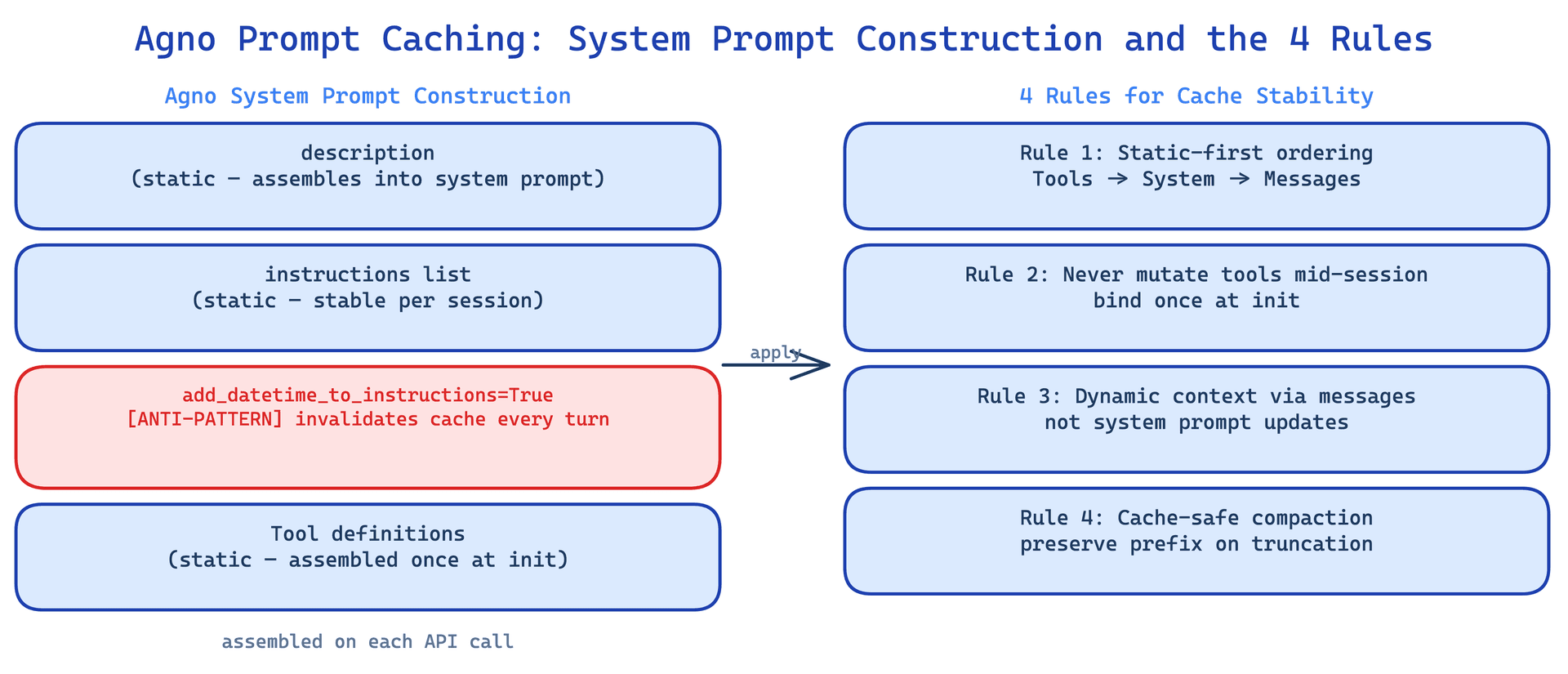
The Agent class assembles the system message from composable parameters in this order:
description → instructions → additional_context → expected_output
This ordering was not accidental. Static content goes first. Dynamic content goes last. The idea is that if you follow the framework's conventions, the most stable parts of your system prompt naturally sit at the front, which is where the cache breakpoint lives.
The Claude model class exposes these cache-relevant parameters:
Claude(
    id="claude-sonnet-4-20250514",
    cache_system_prompt=True,      # adds cache_control to system block
    extended_cache_time=True,       # uses 1-hour TTL
    max_tokens=8192,
)
One thing worth knowing before you assume cache_system_prompt=True is doing everything you need: it only caches the system prompt block. It does not add cache_control to tool definitions or to messages. Agno currently uses one of the four available cache breakpoints. If you have a large tool set and want to cache the tool definitions separately, you would need to extend the Claude class or post-process the request before it goes to the API. That is not in scope for this post, but it is worth knowing the limitation exists.
Rule 1: Static-First Prompt Ordering#
Put everything static in description and instructions. Never put anything dynamic there.
from agno.agent import Agent
from agno.models.anthropic import Claude

agent = Agent(
    model=Claude(
        id="claude-sonnet-4-20250514",
        cache_system_prompt=True,
    ),
    # STATIC — frozen at init
    description="You are a production coding assistant.",
    instructions=[
        "Follow the user's coding standards.",
        "Always run tests before committing.",
        "Never delete files without confirmation.",
    ],
    # CRITICAL: disable timestamp injection
    add_datetime_to_instructions=False,
)
The add_datetime_to_instructions parameter defaults to True in many configurations. What it does is inject a current timestamp into the system prompt text. Because the timestamp changes every second, every API call sees a different system prompt. The cache never stabilises. You pay 1.25× on every single turn and get nothing back.
Set it to False. If your agent genuinely needs the current time, inject it into the user message, not the system prompt. The date is almost always sufficient context, and dates change once per day rather than every second.
There is a related issue with enable_agentic_memory=True. When memory is enabled, Agno injects user memories into the tail of the system prompt. If memories change between turns, the system prompt changes between turns, and the cache breaks. For agents where you want both memory and stable caching, inject memories as messages instead. The system prompt stays frozen. The memory context arrives in the conversation thread where it is expected to vary.
Rule 2: Never Mutate Tools Mid-Session#
Tools are registered at Agent(tools=[...]) and frozen at init. Agno exposes agent.add_tool() and agent.set_tools() for post-init modification, but never call these during an active session. Every tool change invalidates the entire cache.
# GOOD — all tools frozen at init
agent = Agent(
    tools=[SearchTool(), CodeTool(), FileReadTool(), FileWriteTool()],
)

# BAD — invalidates entire cache mid-session
# agent.add_tool(NewTool())
# agent.set_tools(reduced_tools)
The reason is that tool definitions are part of the API payload. When the tool set changes, the payload changes, which means the cache key changes, which means the prefix has to be rebuilt.
The real challenge comes when you want mode switching. A common pattern in agentic systems is to restrict the agent to read-only tools during planning and allow write tools during execution. The instinct is to swap the tool set. That destroys the cache.
The better approach is the tool-as-state-transition pattern. Keep all tools registered at all times. Add enter_plan_mode and exit_plan_mode as regular tool functions:
def enter_plan_mode() -> str:
    """Switch to planning mode. In plan mode, use only read-only tools.
    Do not write files or execute commands. Call exit_plan_mode when done."""
    return "Plan mode activated. Use only read-only tools."

def exit_plan_mode(plan_summary: str) -> str:
    """Exit planning mode with the completed plan."""
    return f"Plan mode deactivated. Executing plan: {plan_summary}"

agent = Agent(
    tools=[
        SearchTool(), CodeTool(), FileReadTool(), FileWriteTool(),
        enter_plan_mode, exit_plan_mode,  # Always present
    ],
)
The behavioral constraint lives in the tool's docstring and in a system-reminder you inject into the user turn. The tool set itself never changes. The model can still see all the tools, it is just instructed not to use certain ones. This works in practice because models follow these constraints reliably, and the cache is never touched.
For large MCP tool sets where you have dozens or hundreds of tools, there is a further refinement: the defer-loading pattern. Send lightweight stubs with just name and description. When the model needs a tool, it calls a ToolSearch function that returns the full schema as message content rather than changing the tool definitions. The tool list stays stable. Full schemas arrive as messages when needed. This is how you keep large tool catalogs from blowing up your context window while also keeping the cache intact.
Rule 3: Dynamic Context via Messages#
Once the system prompt is frozen, all the dynamic context has to go somewhere. That somewhere is the user message.
import datetime

def build_user_message(user_input: str, context: dict) -> str:
    reminder = f"""<system-reminder>
# Current State
- Date: {datetime.datetime.now().isoformat()}
- Working directory: {context.get('cwd', '.')}
- Git branch: {context.get('branch', 'main')}
- Open files: {', '.join(context.get('open_files', []))}
</system-reminder>

{user_input}"""
    return reminder

response = agent.run(build_user_message("Fix the login bug", {
    "cwd": "/app/src",
    "branch": "fix/auth-flow",
    "open_files": ["auth.py", "login_view.py"],
}))
The <system-reminder> tag is a convention, not a magic string. What matters is that the state context arrives in the user turn, not in the system prompt. The timestamp is now in the message, where it is fine to change every second.
Agno also has a cleaner built-in pattern for this with add_dependencies_to_context=True:
agent = Agent(
    add_dependencies_to_context=True,
)
response = agent.run(
    "Check the order status",
    dependencies={"order_id": "123", "status": "shipped"}
)
This injects the dependency data into the user message at run time. The system prompt stays frozen. The data the agent needs for this specific invocation arrives through the message, which is precisely where dynamic content belongs.
The principle is the same as what post 2 in this series calls the static-first architecture. The system prompt is infrastructure. It describes who the agent is and what it knows. Messages are runtime. They describe what is happening right now. Mixing the two is the most common way cache performance degrades.
For agents that run across many sessions, the implications go further. Everything about the current session, the user's name, the current file, the open task, belongs in messages. The system prompt should describe an agent that could serve any session, not this session. That is a useful mental model: if you could swap the agent into a different session without changing the system prompt, the separation is right.
Rule 4: Cache-Safe Compaction#
Agno does not have automatic conversation history compaction. When the context window fills up, you have to compact manually. The problem is that compaction is often implemented in a way that accidentally breaks the cache.
The most common mistake is creating a new agent with a different system prompt for the compaction request:
# Wrong — different system prompt, different cache entry
compaction_agent = Agent(
    model=Claude(id="claude-sonnet-4-20250514"),
    instructions=["You are a summarizer."],  # New cache, cold start
)
This creates a completely new cache entry. The compaction call starts cold and pays full price. Worse, once you restart from the summary, you are back to paying full price again until the cache warms up.
The correct approach is to use the same system prompt and the same tools:
# Right — identical prefix, shares the cached prefix
compaction_agent = Agent(
    model=Claude(
        id="claude-sonnet-4-20250514",  # Same model
        cache_system_prompt=True,
    ),
    description=agent.description,       # Same
    instructions=agent.instructions,     # Same
    tools=agent.tools,                   # Same — CRITICAL
)

summary_response = compaction_agent.run(
    "<compaction-request>\n"
    "Summarize the conversation. Preserve all file paths, decisions, and next steps.\n"
    "</compaction-request>\n\n"
    f"Conversation:\n{format_history(parent_history)}"
)
When the prefix is identical, the compaction request reads the system prompt and tool definitions from cache. An 18K token prefix comes in at 0.1× cost. The compaction itself is expensive because you are processing the full conversation history, but the prefix cost is not paid again.
The reason tools=agent.tools is marked critical is that tool definitions often account for a significant portion of the prefix. An agent with 20 tools can have 5,000 tokens in tool definitions alone. If the compaction agent has different tools, those 5,000 tokens are not cached, and you pay full price for them.
Agno does have built-in compression for tool results, which is separate from conversation compaction:
agent = Agent(
    compress_tool_results=True,
    compress_tool_results_limit=3,   # Trigger after 3 tool calls
)
This handles the case where tool results are large and growing. It compresses older results to free up context space incrementally. Use it when you have tools that return large payloads. It does not replace the conversation compaction pattern above, which you still need when the full context window fills up.
The long-running agent harness post covers compaction strategy in more detail, including how to decide when to compact versus when to start a fresh session. The short version: compact when you still have enough room to complete the current task. Do not wait until the context is full.
Reading Cache Metrics in Agno#
Agno exposes cache metrics directly on the response object:
response = agent.run("Do something")
print(response.metrics.cache_write_tokens)
print(response.metrics.cache_read_tokens)
A healthy multi-turn session looks like this:
- Turn 1:
cache_write_tokens > 0,cache_read_tokens = 0— cold start, prefix being written to cache - Turn 2+:
cache_read_tokenslarge,cache_write_tokens = 0or minimal — prefix being read from cache
If you see cache_write_tokens > 0 on turn 3 or later without a compaction, something is invalidating the prefix. The usual suspects, in order of frequency: add_datetime_to_instructions=True, memory injection mutating the system prompt, a tool being added mid-session, or an additional_context field that is being set dynamically.
Log these metrics from the start. It is much easier to catch cache instability when you are watching the numbers than when you are looking at an unexpectedly large API bill at the end of the week.
If the prefix is large, say 15K tokens or more, a single turn of cache writes at 1.25× versus cache reads at 0.1× is a 12× difference in that portion of the cost. At any meaningful call volume, that compounds fast. The agentic apps cost post has the cost math worked out in more detail if you want to run the numbers for your specific situation.
The diagnostic I now run on any new Agno agent before deploying to production: 10 sequential turns on the same agent instance, logging cache metrics on each turn. If turn 3 still shows cache writes, stop and find the cause before shipping.
Prompt caching in Agno is mostly a matter of following the framework's conventions and not fighting them. The static-first ordering of description → instructions is there to help you. add_datetime_to_instructions=False is one line. Freezing the tool set at init is the default when you are not calling add_tool() or set_tools(). The message-based dynamic context pattern is how Agno's dependencies parameter was designed to work.
The place where you do have to think carefully is compaction. Most people implement it wrong the first time. The instinct to use a simple summariser agent is natural. The cost of getting it wrong is that you lose the cache benefit at exactly the moment when you most need it, because compaction happens when the context is large.
Post 4 in this series will cover production observability: how to track cache hit rates across sessions, how to alert when something is busting the prefix in production, and what a healthy caching dashboard looks like for a long-running agentic service.
FAQ#
Does cache_system_prompt=True also cache tool definitions in Agno?
No. cache_system_prompt=True adds cache_control to the system prompt block only. Tool definitions are part of the API payload but are not marked for caching by this parameter. Agno currently uses one of four available cache breakpoints. To cache tool definitions separately, you would need to extend the Claude class and post-process the request to add cache_control to the tools array. This is not built in.
What is the best way to handle user-specific context that changes per session?
Inject it via messages, not the system prompt. Use the dependencies parameter at agent.run() time, or prepend a <system-reminder> block to the user message. The system prompt should be generic enough that it could serve any user. The per-session context arrives through the message thread, where it is expected to vary.
How do I handle the case where I want the agent to use different tools for different tasks?
Use the tool-as-state-transition pattern. Keep all tools registered at init. Add enter_plan_mode and exit_plan_mode style functions that signal the behavioral constraint via their docstrings. Inject a system-reminder into the user message that reinforces the constraint. The model will follow it. The tool set stays frozen. The cache stays stable.
When should I use extended_cache_time=True vs the default 5-minute TTL?
The default TTL is 5 minutes. extended_cache_time=True extends it to 1 hour. Use the extended TTL when your sessions run longer than 5 minutes, when your agent handles multiple user requests over a longer window, or when you have a large prefix that is expensive to rebuild. The cost of the extended TTL is slightly higher per write, but for any session lasting more than a few minutes the tradeoff is favourable. For short-lived agents that complete in under 2 minutes, the default TTL is fine.
How does enable_agentic_memory=True interact with caching?
When memory is enabled, Agno injects memories into the tail of the system prompt. If the memory content changes between turns, the system prompt changes, and the cache is invalidated. For agents where cache stability matters, inject memories as messages instead. You get the same contextual benefit. The system prompt stays frozen.
What is the performance impact of the tool-as-state-transition pattern vs genuinely switching tool sets?
Minimal, as long as your total tool count stays within reason. The model sees all tools on every turn, which means it processes all the tool schemas. For 5 to 15 tools this is not a meaningful overhead. For very large tool catalogs, say 50 or more tools, use the defer-loading pattern: register lightweight stubs and provide full schemas via a ToolSearch tool when the model needs them. This keeps the registered tool list small, maintains cache stability, and avoids flooding the context window with schemas the agent will not use.