Last week I needed to rename getUserData to fetchUserProfile across 40 files. This was not a find-and-replace job. The function signature changed. The return type changed. Three callers needed new error handling because the renamed function now threw on missing profiles instead of returning null. Every test file referencing the old name needed updating. And a few components had imported it under an alias.
Claude Code is a terminal-native AI agent that reads an entire codebase, reasons about intent, and executes coordinated changes across many files without requiring a developer to navigate to each one. It matters because it shifts the unit of AI-assisted work from the individual edit to the complete task outcome. Unlike IDE-native tools, it responds to what you want done rather than to where you are looking.
I did this task twice. Once in Cursor. Once in Claude Code. Both finished. Both produced correct results. But the experience was so different that it clarified something I had been circling for months: these two tools are not competing with each other. They are not even solving the same problem. They occupy fundamentally different positions in a developer's workflow, and understanding that difference changes how you use both of them.
Cursor felt like working with a surgeon. I opened the file, highlighted the function, and the AI knew exactly what I wanted. It suggested the rename, updated the imports in the current file, and let me tab through changes one by one. Precise. Controlled. I could see every edit before it happened. But I had to visit each of the 40 files myself, accept or reject each change, and manually verify the test files.
Claude Code felt like hiring a general contractor. I described the outcome I wanted in plain English. "Rename getUserData to fetchUserProfile across the entire codebase, update the return type to throw on missing profiles, fix all callers and tests." Then I watched it work. It read the codebase, found every reference, made the changes, ran the tests, fixed two failures it introduced, and came back with a summary. I reviewed the diff. It was correct.
Same task. Two completely different relationships with the tool. And both were the right choice depending on what you optimize for. Here is the deeper story of why.
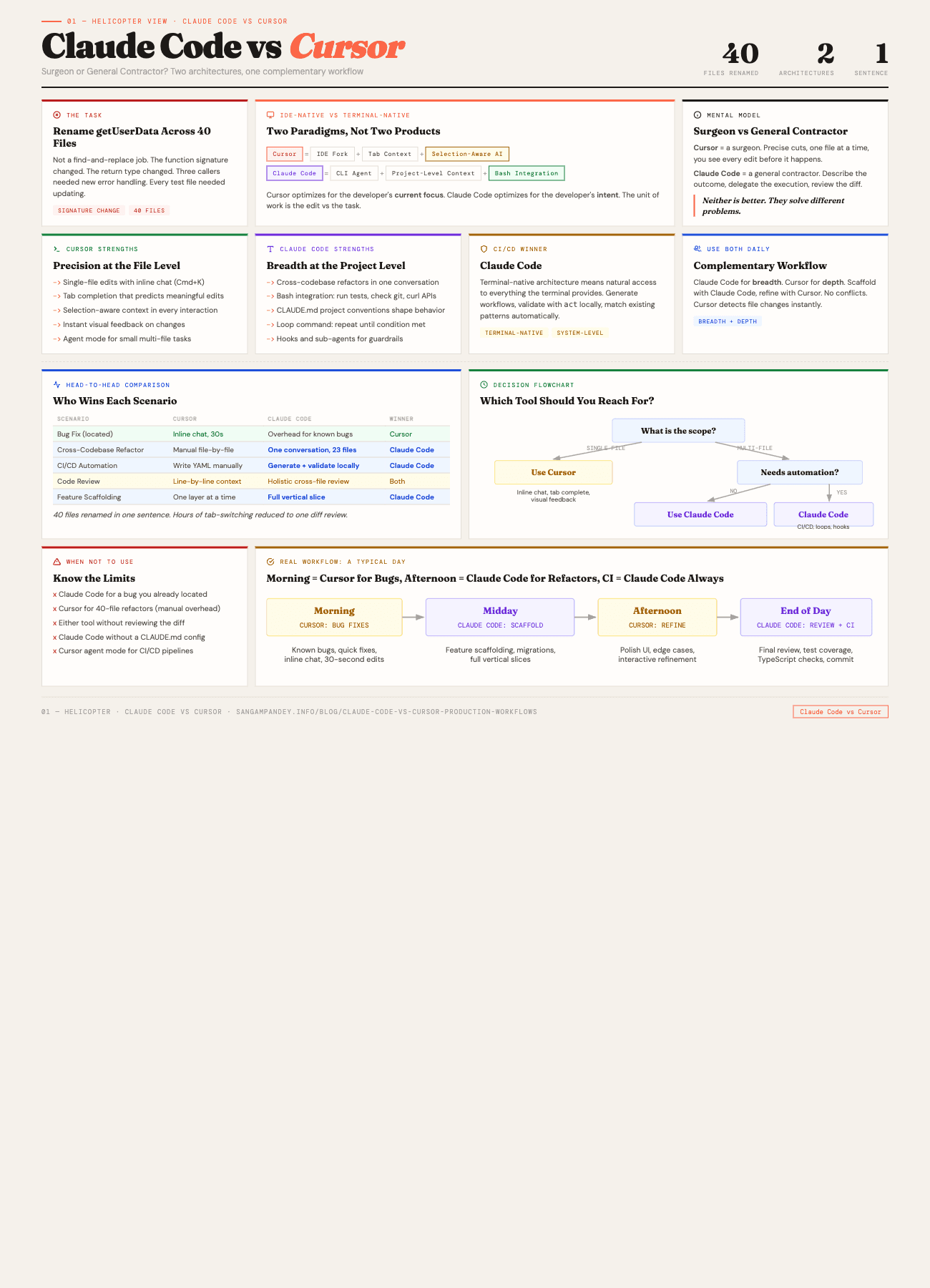
For a visual comparison of both architectures, see the Claude Code vs Cursor infographic.
Table of Contents#
- What is the difference between Claude Code and Cursor?
- IDE-native vs terminal-native: what each means architecturally
- Cursor deep dive
- Claude Code deep dive
- Head-to-head comparison table
- Head-to-head: five real scenarios
- When should you use Cursor over Claude Code?
- Can you use Claude Code and Cursor together?
- Cost comparison and practical setup
- FAQ
What is the difference between Claude Code and Cursor?#
The mistake most comparisons make is treating Claude Code and Cursor as interchangeable AI coding assistants that happen to have different UIs. That framing misses the architectural reality.
Cursor is an IDE. It is a fork of VS Code with AI woven into every interaction surface. Tab completion, inline chat, multi-file editing, agent mode. The AI lives inside your editor and responds to what you are looking at, what you have selected, and what files you have open.
Claude Code is a terminal agent. It is a CLI tool that reads your codebase, reasons about it, and executes changes through bash commands and file operations. It does not live in your editor. It does not know what tab you have open. It knows your project structure, your CLAUDE.md configuration, and whatever context you give it through conversation.
This distinction sounds superficial until you think about the implications.
An IDE-native tool is optimized for the developer's current focus. It excels when you know which file you are in, what you want to change, and you need the AI to help you do it faster. The unit of work is the edit.
A terminal-native agent is optimized for the developer's intent. It excels when you know what outcome you want but do not want to micromanage the path to get there. The unit of work is the task.
Neither is better. They are different tools for different shapes of work. And most production workflows involve both shapes, often in the same day.
Key takeaway: Cursor is an IDE-native tool optimized for the edit. Claude Code is a terminal-native agent optimized for the task. They are two paradigms, not two products.
What does IDE-native vs terminal-native mean architecturally?#
To understand why these tools behave so differently, it helps to look at how they consume context.
Cursor's context model is tab-based and selection-aware. When you open a file, Cursor indexes it. When you highlight code, that selection becomes the primary context for any AI interaction. When you use @ mentions in chat, you are manually adding files or symbols to the context. The AI sees what you show it, plus whatever it can infer from the surrounding code.
This is a powerful model for precision work. The AI always knows exactly where you are. It can suggest completions that match your current coding style because it is reading the same file you are reading. The autocomplete is not just token prediction. It is contextually aware, anticipating what you will type based on the function you are in, the variable you just declared, the pattern you are following.
The limitation is scope. Cursor's agent mode can read other files and make multi-file changes, but its natural posture is focused. It is designed for a developer who is actively navigating the codebase and wants AI assistance at each stop.
Claude Code's context model is project-level and intent-driven. When you start a session, it can read any file in your project. It builds a mental model of your codebase through tool calls. It reads your CLAUDE.md for project conventions, uses glob and grep to find relevant files, and constructs its own understanding of the architecture before making changes.
This is a powerful model for broad operations. You do not need to navigate to the right files. You do not need to open tabs. You describe what you want, and the agent figures out which files to touch. It can operate on files you did not even know existed, finding references and dependencies you would have missed.
The limitation is visibility. You do not see each edit as it happens in the way you do inside an IDE. You see the summary after. You review the diff. This requires a different kind of trust, one that is built through verification rather than observation.
How does Cursor work for AI-assisted development?#
Cursor has become the default AI-enhanced IDE for a reason. It does several things exceptionally well.
Tab completion that actually understands context#
Every AI coding tool offers autocomplete. Cursor's version is different because it is not just predicting the next token. It is predicting the next meaningful edit. If you are writing a function that mirrors a pattern from elsewhere in your codebase, Cursor will suggest the entire implementation. If you are adding a new field to an interface, it will suggest the corresponding updates in related files.
The tab-based flow feels like pair programming with someone who has already read your code. You write the function signature, tab to accept the body. You start a test, tab to accept the assertion. The rhythm is fast and the suggestions are usually close enough that you save more time accepting and tweaking than you would writing from scratch.
Conversational editing with inline chat#
Cursor's inline chat (Cmd+K on macOS) lets you describe a change in natural language and see the diff immediately. Select a block of code, describe what you want changed, and the AI rewrites it in place. You accept or reject. There is no context switching. You stay in the same file, looking at the same code.
This is where Cursor shines for surgical edits. Refactoring a single function, adding error handling to a specific block, converting a class component to a hook. The feedback loop is tight. You see the change, you accept it, you move on.
Agent mode#
Cursor's agent mode is its answer to multi-file operations. You describe a task in the chat panel, and the agent can read files, create files, run terminal commands, and make coordinated changes across your project.
Agent mode is genuinely useful. It can scaffold components, add tests, and make cross-file refactors. But it still operates within the IDE paradigm. The changes appear in your editor. You review them file by file. The agent's understanding of your project is built from the files it reads during the conversation, not from a persistent project-level configuration.
Where Cursor excels#
Cursor is at its best when you are doing focused, precise work within a codebase you understand well. Specific scenarios where I reach for it without hesitation:
- Implementing a new function when I know exactly where it goes
- Refactoring a single module or component
- Writing tests for code I am currently reading
- Prototyping UI changes where I want instant visual feedback
- Exploring unfamiliar code with AI-assisted explanations
- Quick fixes where I can point to the exact problem
The common thread is that I know which files matter. I am navigating. The AI is accelerating my movement through code I am already engaged with.
How does Claude Code handle project-level tasks?#
Claude Code approaches the problem from the opposite direction. Instead of enhancing an editor, it enhances the terminal. Instead of augmenting your navigation, it replaces navigation with intent.
Project-level operations#
The fundamental unit of work in Claude Code is not the edit. It is the outcome. You describe what you want at the project level, and the agent determines which files to read, which to modify, and in what order.
This sounds simple. It is not. Project-level reasoning requires the agent to build a working model of your codebase architecture. Claude Code does this through a combination of file reading, grep searches, and the conventions you define in CLAUDE.md. When I tell it to "add rate limiting to all API routes," it does not need me to list the routes. It finds them. It reads the existing patterns. It applies rate limiting consistently, matching the error handling style already present in the codebase.
I wrote about how CLAUDE.md and project configuration shape agent behavior. The short version: the more intentional your project configuration, the better Claude Code performs on broad operations. This is context engineering applied to tooling.
Bash integration and system-level operations#
Because Claude Code runs in the terminal, it has natural access to everything your terminal has access to. It can run your test suite. It can check git status. It can execute build commands. It can curl an API. It can read environment variables.
This matters more than it sounds. When Claude Code makes a change and then runs your test suite to verify it, the verification happens in the same environment where the code runs. There is no simulated environment, no approximation. The tests run against the real codebase with the real configuration.
The loop command takes this further. You can tell Claude Code to keep working until a condition is met. "Fix all TypeScript errors" becomes a loop where the agent runs tsc, reads the errors, fixes them, and runs tsc again until the output is clean. This is not something an IDE-native tool is designed to do.
Hooks and sub-agents#
Claude Code's hook system lets you run automated checks before and after tool calls. A PostToolUse hook can auto-format files after every edit. A PreToolUse hook can validate parameters before a bash command runs. These are invisible guardrails that keep the agent on track without manual intervention.
Sub-agents extend this further. You can spawn focused agents for specific subtasks. A security review agent that checks for hardcoded secrets. A test agent that verifies coverage. These compose into workflows that would require manual orchestration in an IDE.
For a deeper look at how these pieces fit together, the five pillars of agentic engineering framework covers the design principles behind this kind of agentic tooling.
Where Claude Code excels#
Claude Code is at its best when the task is bigger than a single file and you care more about the outcome than the process. Specific scenarios where it is the obvious choice:
- Cross-codebase refactors (like the rename that opened this post)
- CI/CD automation and script generation
- Enforcing patterns across an entire project
- Generating boilerplate that must be consistent across many files
- Running multi-step workflows (change, test, fix, verify)
- Code review and security audits
- Any task where you would say "do this everywhere" rather than "do this here"
The common thread is that you do not want to navigate. You want to delegate.
How do Claude Code and Cursor compare across task types?#
Before walking through specific scenarios, here is the full picture. This table covers six common task types and shows which tool wins each one.
| Task Type | Cursor | Claude Code | Winner |
|---|---|---|---|
| Single-file bug fix | Inline chat, 30 seconds, immediate visual feedback | Works but adds overhead for already-located bugs | Cursor |
| Cross-codebase refactor | Agent mode handles parts, manual coordination across files | One conversation, finds all references, runs tests automatically | Claude Code |
| CI/CD pipeline setup | Write YAML with autocomplete, test by pushing | Generate, validate locally with act, match existing patterns | Claude Code |
| Code review | Line-by-line context, question specific changes | Holistic cross-file review, catches inconsistencies | Both |
| Feature scaffolding | One layer at a time, manual consistency checks | Full vertical slice, all layers consistent | Claude Code |
| UI polish and refinement | Instant visual feedback, interactive iteration | Lacks visual proximity, changes require diff review | Cursor |
Each tool wins a different shape of work. Neither is better across the board.
How do Claude Code and Cursor perform in real production scenarios?#
Theory is useful. Practice is better. Here are five scenarios I have encountered in production work over the past quarter, with honest observations about how each tool handled them.
Scenario 1: Bug fix in one component#
The task. A React component was not re-rendering when a specific prop changed because the useEffect dependency array was missing a value.
In Cursor. I opened the component, spotted the useEffect, used inline chat to say "this effect is missing the userId dependency." Cursor highlighted the fix, I tabbed to accept. Total time: about 30 seconds. I was already looking at the code when I noticed the bug, so staying in the editor was the natural flow.
In Claude Code. I could have said "the UserProfile component is not re-rendering when userId changes, fix it." Claude Code would have found the file, identified the dependency array issue, and fixed it. But by the time I typed the prompt and waited for it to read the file, I could have already fixed it in Cursor. For a bug I have already located, the IDE is faster.
Verdict. Cursor. When you know where the bug is, surgical precision wins.
Scenario 2: Cross-codebase refactor#
The task. Migrate from a custom API client to a generated SDK. This touched 23 files, required updating import paths, changing function call signatures, and modifying error handling patterns.
In Cursor. Agent mode could handle parts of this. I could feed it the SDK documentation and ask it to migrate one file at a time. But the coordination across 23 files, making sure every import was updated, every error handler matched the new SDK's error types, every test was updated to mock the new client. That required me to manage the process manually, checking each file, verifying consistency across the migration.
In Claude Code. I gave it the SDK documentation as context, described the migration rules, and let it work. It found all 23 files that imported the old client. It migrated each one. It ran the test suite after each batch of changes. When two tests failed because the new SDK returned errors differently, it fixed the assertion expectations. The whole migration was a single conversation.
Verdict. Claude Code. Multi-file operations with consistency requirements are where the terminal agent shines.
Scenario 3: CI/CD automation#
The task. Set up a GitHub Actions workflow for a new service that builds, tests, deploys to staging, runs smoke tests, and promotes to production with manual approval.
In Cursor. I could write the YAML in the editor with AI assistance. Cursor would suggest steps, help with the syntax, and autocomplete action names. But I would still be writing the workflow manually, looking up action versions, and testing by pushing to see if it ran.
In Claude Code. I described the deployment pipeline. Claude Code generated the workflow file, read my existing workflows for style consistency, set up the correct Node version matrix based on my package.json engines field, and then ran act locally to validate the workflow before I even pushed. It also generated the staging and production environment configurations.
Verdict. Claude Code. CI/CD work is fundamentally about system-level operations, which is the terminal agent's home territory.
Scenario 4: Code review#
The task. Review a pull request with 14 changed files before merging.
In Cursor. I can open the PR branch, look at each file, and use inline chat to ask questions about specific changes. "Is this null check sufficient?" "Could this cause a race condition?" The feedback is contextual and immediate. I see the code, I ask about the code, I get answers about the code.
In Claude Code. I point it at the diff. "Review the changes in this PR for security issues, performance regressions, and consistency with our existing patterns." It reads all 14 files, cross-references the changes with the rest of the codebase, and produces a structured review. It catches things that are hard to see file-by-file, like when a change in one file creates an inconsistency with an unchanged file elsewhere.
Verdict. Both, for different aspects. Cursor for detailed line-by-line review where I want to understand intent. Claude Code for holistic review where I want to catch cross-file inconsistencies.
Scenario 5: New feature scaffolding#
The task. Add a new user notifications feature. This requires a database migration, an API route, a service layer, a React component, and tests for each layer.
In Cursor. Agent mode can scaffold one layer at a time. I can describe the API route, get it generated, then describe the service layer, then the component. Each individual piece is well-crafted because I am guiding it through each file. But the coordination, making sure the API route returns the shape the component expects, making sure the service layer errors match what the route catches, that is on me.
In Claude Code. I describe the feature at the system level. "Add a notifications feature. Users should see unread notifications in a bell icon. Clicking shows a dropdown with notification items. Notifications are stored in Postgres, served through a REST endpoint, and the component polls every 30 seconds." Claude Code scaffolds the entire vertical slice. Migration, route, service, component, tests. Each layer is consistent with the others because the same agent built all of them.
Verdict. Claude Code for the initial scaffold. Then Cursor for refinement and polish of individual components. This is where the complementary workflow starts to emerge.
Key takeaway: Across five real production scenarios, Claude Code won three outright, Cursor won one, and one was a tie. The pattern is consistent: single-file precision goes to Cursor, multi-file breadth goes to Claude Code.
When should you use Cursor over Claude Code?#
Reach for Cursor when you already know which file needs work. Bug fixes where you have located the problem. Refactoring a single function or component. Writing tests for code you are currently reading. Prototyping UI changes where instant visual feedback matters. Exploring unfamiliar code with AI-assisted explanations. Any task where the scope is one file or a small cluster of related files.
The key signal is that you are navigating. You know where you are going. You want the AI to accelerate your movement, not replace it.
Reach for Claude Code when you would describe the work as "do this everywhere" rather than "do this here." Cross-codebase refactors. CI/CD automation. Enforcing patterns across an entire project. Generating consistent boilerplate across many files. Running multi-step workflows that involve changing code, running tests, fixing failures, and verifying results. Any task where navigating file by file would take significantly longer than describing the outcome you want.
Can you use Claude Code and Cursor together?#
After months of using both tools, I have settled into a pattern that uses each where it is strongest. The framework is simple enough that I can describe it in one sentence: Claude Code for breadth, Cursor for depth.
Here is what a typical day looks like.
Morning planning. I open Claude Code and describe the day's goals at the project level. "Today I need to add pagination to the listings endpoint, fix the auth token refresh bug, and clean up the unused utility functions." Claude Code reads the codebase, identifies the relevant files, and sometimes spots dependencies I had not considered. "The listings endpoint is also called by the mobile app client, so the pagination parameters need to be backward compatible." That kind of project-level awareness is valuable before I write a single line.
Feature work. For the pagination task, I let Claude Code do the scaffolding. It adds the query parameters to the API route, updates the database query with limit and offset, modifies the response envelope to include pagination metadata, and updates the three callers. Then I open Cursor to refine the implementation. Maybe I want the cursor-based pagination to handle edge cases differently. Maybe the loading state in the UI needs a skeleton component that I want to design interactively. Cursor's inline editing is perfect for this kind of focused refinement.
Bug fixes. The auth token refresh bug is in a specific module. I already know which file. I open it in Cursor, read the code, use inline chat to reason through the race condition, and fix it. Done in five minutes. Claude Code would have been overhead for a task this focused.
Cleanup. Finding and removing unused utility functions across a codebase is Claude Code's specialty. "Find all exported functions in src/lib/utils that are not imported anywhere else in the codebase. List them, then remove the ones I confirm." It does the analysis, I review the list, I confirm, it removes them. This is a task where navigating file by file in an IDE would take an hour. Claude Code finishes in minutes.
End of day. I use Claude Code for a final review pass. "Check that all changes today are properly tested and there are no TypeScript errors." It runs the checks, fixes a missing test I forgot, and I commit.
This is not a rigid process. Some days are all Cursor because I am deep in a single complex component. Some days are all Claude Code because I am doing infrastructure work. The point is that having both tools available lets me match the tool to the shape of the work rather than forcing every task into one paradigm.
The AI-native engineer framework I wrote about previously describes this as fluency in multiple AI modalities. Just as a developer who only knows one programming language is limited in ways they cannot see, a developer who only uses one AI tool is leaving capability on the table.
Key takeaway: Yes, you can and should use both daily. Claude Code for breadth, Cursor for depth. They read the same codebase without conflicts. Cursor detects Claude Code's file changes instantly.
How do Claude Code and Cursor compare on cost and setup?#
Practical matters. Both tools cost money, and both have different pricing models that affect how you use them.
Cursor pricing#
Cursor offers a free tier, a Pro tier at $20 per month, and a Business tier at $40 per month. The Pro tier includes 500 "fast" completions per month (using their best model) and unlimited "slow" completions. The Business tier adds team features. For agent mode and advanced features, you may also connect your own API keys (Anthropic, OpenAI) for additional usage.
The pricing model is predictable. You know your monthly cost upfront. The trade-off is that heavy users may hit the fast completion limit and need to wait for slow completions or use their own API keys.
Claude Code pricing#
Claude Code is billed through your Anthropic API usage. There is no fixed monthly fee. You pay per token consumed. Typical daily cost for active development ranges from $5 to $15, depending on how many tokens your sessions consume. Heavy multi-file operations and long sessions cost more because they consume more context.
The pricing model scales with usage. Light days are cheap. Heavy refactoring days are expensive. This is great for flexibility but makes costs less predictable. The ENABLE_PROMPT_CACHING_1H flag helps significantly by caching frequently referenced context.
Setting up the complementary workflow#
If you want to run both tools, the setup is straightforward.
- Install Cursor as your primary IDE. Configure it with your preferred AI provider keys if you want to go beyond the included completions.
- Install Claude Code as a CLI tool. Set up your CLAUDE.md with project conventions, configure hooks for auto-formatting, and define any custom skills your project needs.
- Use Cursor for file-level work. Open files, make edits, use inline chat, use agent mode for single-feature scaffolding.
- Use Claude Code for project-level work. Open a terminal alongside Cursor (or in a separate window) for refactors, automation, reviews, and multi-file operations.
- Let both tools read the same codebase. There are no conflicts. Cursor watches the file system for changes, so edits Claude Code makes appear in your editor immediately.
One practical note: when Claude Code makes changes, Cursor will detect the file modifications and may offer its own suggestions on top of them. This is usually fine and sometimes useful. You get a second opinion for free.
Is one tool enough?#
If I had to pick one, the answer depends on what I build.
For frontend-heavy work where I am spending most of my time in a few components, Cursor alone is excellent. The tight feedback loop, the inline suggestions, the visual proximity to the code. It covers 80 percent of what I need.
For backend-heavy work with multiple services, infrastructure-as-code, and cross-cutting concerns, Claude Code alone handles the majority of tasks. The project-level reasoning and bash integration make it the natural choice.
But having both is genuinely better than having either alone. They cover each other's blind spots in ways that compound over a full work week.
FAQ#
Do Claude Code and Cursor work on the same codebase without conflicts?#
Yes. Claude Code operates through the file system, and Cursor watches for file changes. When Claude Code modifies a file, Cursor detects the change and updates the editor view. There are no lock conflicts or synchronization issues. The only thing to be aware of is that if you have unsaved changes in Cursor and Claude Code modifies the same file, you will get a standard file conflict prompt. Save your work before running Claude Code on files you are actively editing.
Can Cursor's agent mode replace Claude Code for multi-file tasks?#
For small multi-file tasks, yes. Cursor's agent mode can read and modify multiple files and even run terminal commands. For large-scale refactors across dozens of files, CI/CD automation, or tasks that require running and re-running test suites as part of the workflow, Claude Code's terminal-native architecture and loop capabilities give it a significant advantage. The two tools have overlapping capabilities but different ceilings.
Which tool is better for someone just starting with AI-assisted development?#
Cursor has a gentler learning curve because it lives inside a familiar IDE. You get immediate value from tab completions and inline chat without changing your workflow. Claude Code requires comfort with the terminal and a willingness to delegate tasks to an agent you cannot watch keystroke by keystroke. I would recommend starting with Cursor, getting comfortable with AI-assisted editing, and then adding Claude Code when you find yourself doing repetitive multi-file tasks or wishing you could automate parts of your workflow.
How do I manage costs when using both tools?#
Cursor has a fixed monthly cost (Pro at $20/month), so that is predictable. Claude Code costs vary with usage. A practical approach is to use Claude Code for the tasks where it saves the most time, which tend to be the most expensive tasks anyway. A cross-codebase refactor that would take you four hours but costs $8 in API usage is still a good trade. Track your Anthropic API usage for the first week to establish a baseline, then decide whether the time savings justify the cost for your workflow.
What happens when Cursor adds more agentic features? Will Claude Code become redundant?#
Cursor is actively improving its agent mode, and it will likely get better at multi-file operations over time. But the architectural difference matters. Cursor will always be optimized for the IDE context, for a developer who is looking at code and wants AI help. Claude Code is optimized for the terminal context, for a developer who wants to describe an outcome and delegate the execution. These are different interaction models that serve different cognitive modes. Even if both tools gain each other's features, the primary paradigm of each will continue to shape how they are best used. An IDE-first tool and a terminal-first agent serve different cognitive modes, and that gap does not close just because both tools gain overlapping features.
Is it worth switching from GitHub Copilot to Cursor?#
Cursor includes Copilot-style autocomplete plus conversational editing, agent mode, and deeper context awareness. If you are paying for GitHub Copilot and want more capable AI assistance, Cursor is a meaningful upgrade. The transition is smooth because Cursor is VS Code-based, so your extensions, keybindings, and settings carry over.
Can I use Claude Code with editors other than Cursor?#
Absolutely. Claude Code is editor-agnostic because it runs in the terminal. You can use it alongside VS Code, Neovim, JetBrains IDEs, Zed, or any other editor. The complementary workflow described in this post works with any IDE. Cursor just happens to be the strongest AI-native IDE option right now, which is why I pair them.
The surgeon and the general contractor are not competing for the same job. One makes precise cuts. The other coordinates the entire build. The best projects use both, at the right time, for the right task.
The real skill is not choosing between Claude Code and Cursor. It is knowing which one to reach for when you sit down to work. And that knowledge comes from using both on real projects, not from reading comparison charts.
Start with whichever one matches how you work today. Add the other when you hit its ceiling. You will know when that moment arrives because you will find yourself doing something tedious that the other tool could automate, and you will think: I should not be doing this manually.
That thought is the signal.