There is a specific kind of production incident I have seen play out more times than I want to count. Quality drops. Users start complaining. You go looking for the cause and you find yourself staring at a graveyard of questions with no answers: did someone change a prompt on Tuesday? Did the model vendor push a silent update on Thursday? Was it the new context-stuffing logic that shipped Friday morning?
If you hardcoded your prompts as strings in your application, you cannot answer any of those questions. Not with confidence. You have no audit trail, no diff, no version to roll back to. You are debugging in the dark.
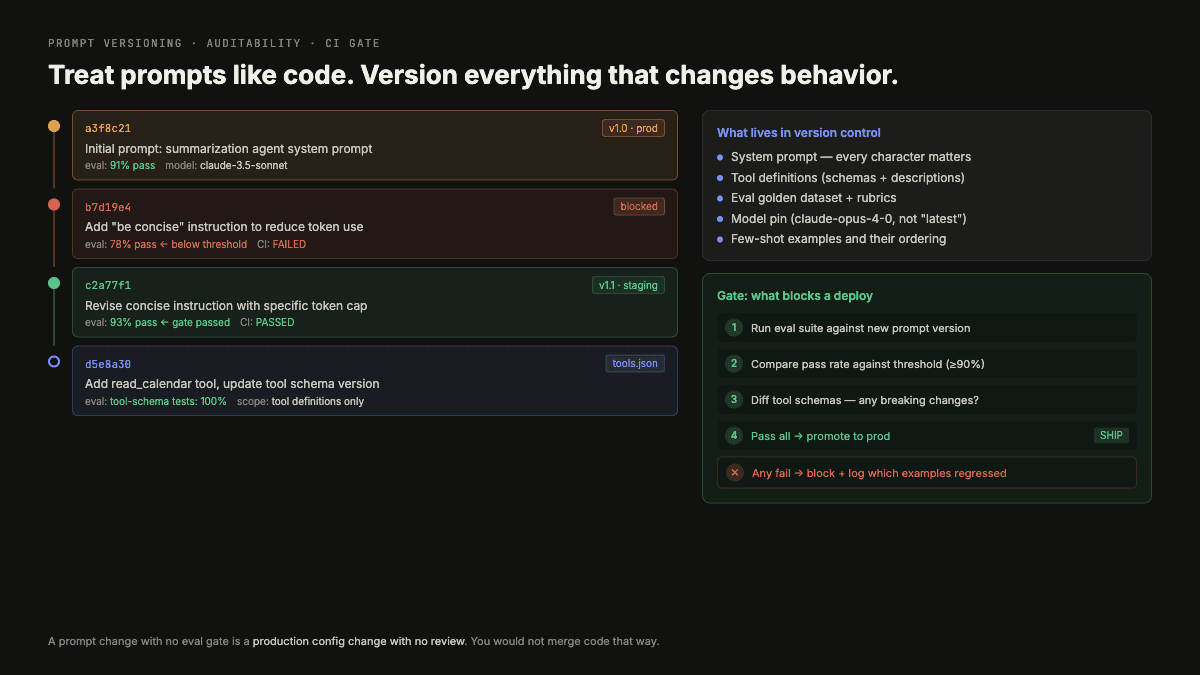
Table of Contents#
- The Real Cost of Prompt-as-String
- What Proper Prompt Versioning Looks Like in 2026
- The Staging Pipeline
- Prompt File Structure
- Tagging Traces to Prompt Versions
- Tool Definitions Are Also Versioned Artifacts
- The Rollback Scenario
- Where to Start
- How I Would Run This in Production
- What I Would Measure
- Where This Connects
- FAQ
This is the exact problem that version control solves for regular code. We just have not applied it to prompts yet.
The Real Cost of Prompt-as-String#
The most common pattern I see on teams just getting started with LLM apps: a prompt lives as a Python string in a notebook, or maybe a constants file, and changes to it get committed as part of larger diffs with vague messages like "tweak prompt for better results."
This feels fine until production breaks. Then you need to answer: which specific prompt version was running when quality dropped? Without a commit that only touched the prompt, without a deployment record tied to that commit, without trace spans tagged to a prompt version ID, you cannot answer that question. You are left doing archaeology through git blame and hoping someone left a comment.
The problem compounds when you have multiple prompts. A production agent might have a system prompt, a retrieval-augmentation template, a summarization prompt, and a routing prompt. Change any of them without a paper trail and you have created four possible culprits every time something goes wrong.
What Proper Prompt Versioning Looks Like in 2026#
The tooling has matured. In 2024, "prompt versioning" meant storing a version number in a spreadsheet. In 2026, it means a full development pipeline: version history tied to evaluations, staged deployment through dev, staging, and production environments, and collaborative workspaces where your team can review prompt changes before they ship.
Three tools have emerged as the practical choices right now.
Braintrust uses content-addressable immutable IDs. The same prompt always produces the same ID, which means you can verify prompt integrity deterministically. It integrates natively with GitHub Actions and can post metric deltas directly to PR comments, so your reviewers see eval scores change before merging. In practitioner evaluations it consistently scores around 94/100 for prompt management workflows. The content-addressable approach is particularly smart: it means you get deduplication for free, and you can detect drift if someone manually edits a deployed prompt.
Langfuse is MIT-licensed and self-hostable, which matters a lot to teams with data residency constraints. It integrates prompt management tightly with tracing, so the link between a specific prompt version and the traces it produced is built in rather than bolted on. Strong community, actively maintained.
PromptLayer has the lowest integration friction of the three. It auto-versions through a wrapper, which means you can adopt it incrementally without restructuring your entire codebase. Good first choice if you need to get something in place quickly.
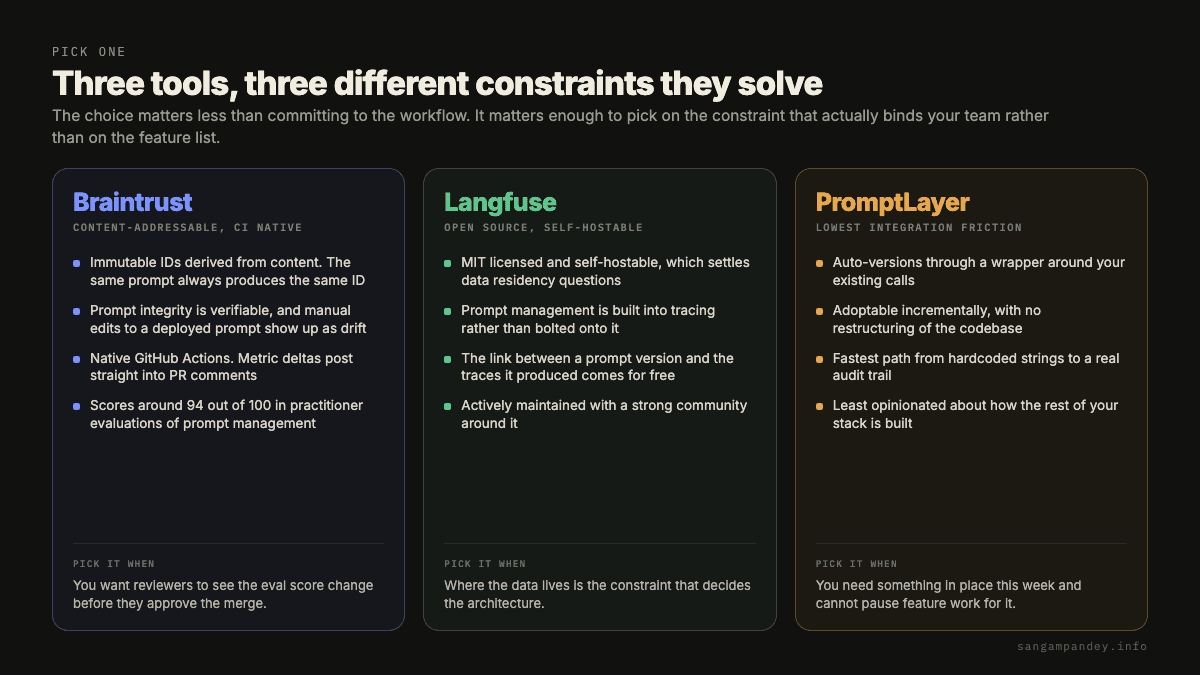
The right tool depends on your team's constraints. But the choice of tool is less important than committing to the workflow.
The Staging Pipeline#
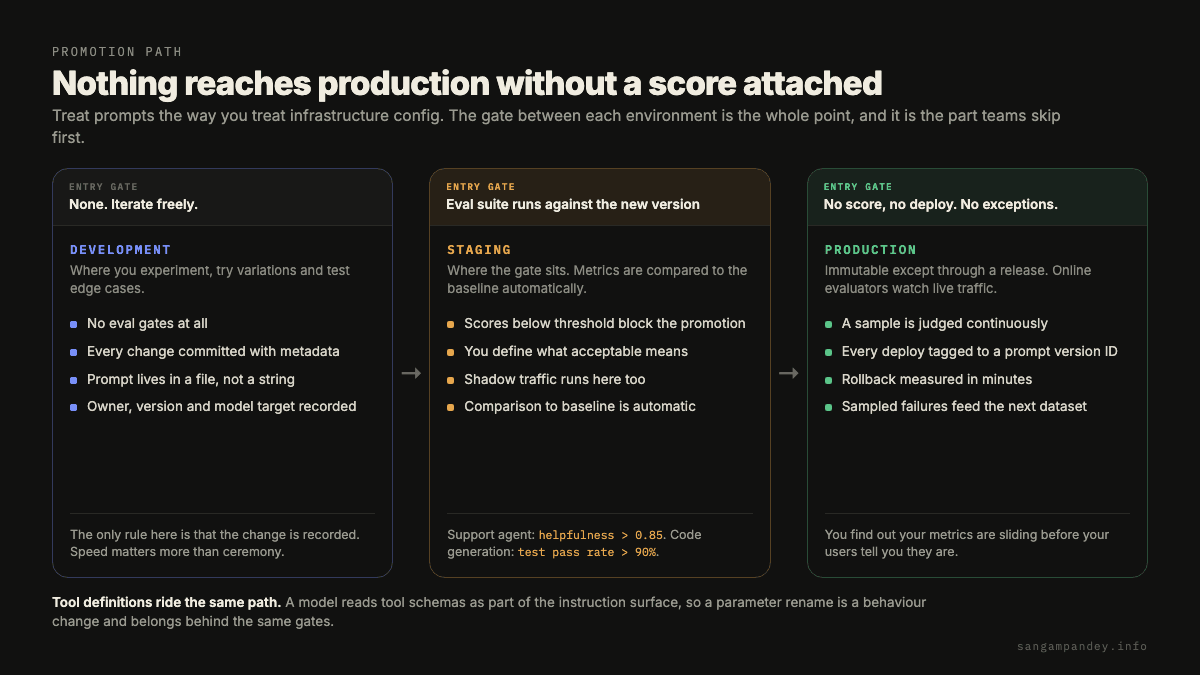
The pattern that actually works is treating prompts like infrastructure configs: nothing goes directly to production.
Development is where you iterate freely. No eval gates. You are experimenting, trying variations, testing edge cases. The only rule is that every change is committed with metadata.
Staging is where the gate sits. When you promote a prompt from dev to staging, your eval suite runs automatically against the new version and compares metrics to the baseline. If the scores drop below threshold, the promotion is blocked. You define what "acceptable" means for your specific use case. For a customer support agent, that might be helpfulness score above 0.85. For a code generation prompt, it might be test pass rate above 90%.
Production runs with online evaluators watching live traffic. Not every response gets evaluated, but a sample does, continuously. The moment your online metrics start sliding, you know about it before users do. And because every deployment is tagged to a specific prompt version ID, you can roll back to the previous version in minutes.
The rule I operate by: no production deployment without an attached eval score. No score, no deploy. This forces every prompt change through evaluation before it touches real users.
Prompt File Structure#
A prompt should be a file, not a string. Here is the structure I use:
# summarization-v2.promptl
version: "2.1.0"
author: "sangam"
date: "2026-06-20"
model_target: "claude-sonnet-4-6"
eval_score: 0.92
eval_dataset_version: "summarization-evals-v4"
description: "Summarization prompt with improved handling of technical documents"

system: |
  You are a technical document summarizer. Your summaries are concise,
  accurate, and preserve the key technical details an engineer would need.
  Do not include filler phrases or restate the question.

user_template: |
  Summarize the following document in under {max_words} words:

  {document}
Several things matter here. The eval_score field ties the deployed prompt to a specific evaluation result. The eval_dataset_version field is equally important: your eval dataset should be version-controlled alongside the prompt, because they are coupled artifacts. A dataset curated against v1 prompts may not be representative for v3 prompts. When you update a prompt significantly, you update the dataset that tests it.
The model_target field is there because prompts are not model-agnostic. A prompt tuned for Claude Sonnet behaves differently on GPT-4. If you switch models, you version the prompt again.
Tagging Traces to Prompt Versions#
Version control only solves half the problem. The other half is trace-to-version linkage: every trace in production needs to record which prompt version produced it.
In practice this looks like adding a span attribute:
with tracer.start_as_current_span("summarize") as span:
    prompt = prompt_registry.get("summarization", version="2.1.0")
    span.set_attribute("prompt.id", prompt.content_hash)
    span.set_attribute("prompt.version", prompt.version)
    span.set_attribute("prompt.eval_score", prompt.eval_score)

    response = llm.complete(prompt.render(document=doc, max_words=150))
    span.set_attribute("response.quality_score", evaluator.score(response))
With this in place, your observability question becomes answerable. You can query: "show me all traces from prompt version 2.0.0 and compare quality scores to version 2.1.0." You can identify whether the quality drop on Thursday was correlated with a specific prompt version or predated the prompt change. You can do a post-mortem with actual data.
Without this linkage, you have tracing and you have versioning, but they are two separate silos that do not talk to each other.
Tool Definitions Are Also Versioned Artifacts#
One thing teams consistently overlook: tool definitions in agent workflows deserve the same versioning discipline as prompts.
Changing a tool's parameter schema is a breaking change. It affects prompt caching efficiency because the cache key includes tool definitions. It can change agent behavior if the model interprets the new schema differently. Adding a new tool changes which actions are available to the agent, which changes the solution space it explores.
Every tool definition change should go through the same dev, staging, and prod pipeline as prompt changes. Same eval gates. Same rollback capability.
The Rollback Scenario#
Here is the scenario that makes this real. You ship a new prompt version on Tuesday. By Wednesday afternoon, your online evaluators show a 12% drop in helpfulness scores. With proper versioning and trace tagging, you know immediately that the quality drop correlates with the new prompt version. You roll back to the previous version in minutes. Scores recover.
Without version control: you notice the drop because users start complaining on Thursday. You spend three hours trying to figure out what changed. You find the prompt change buried in a git commit with eight other modifications. You are not sure if reverting just the prompt is safe. You roll back the entire deployment and lose two days of other improvements.
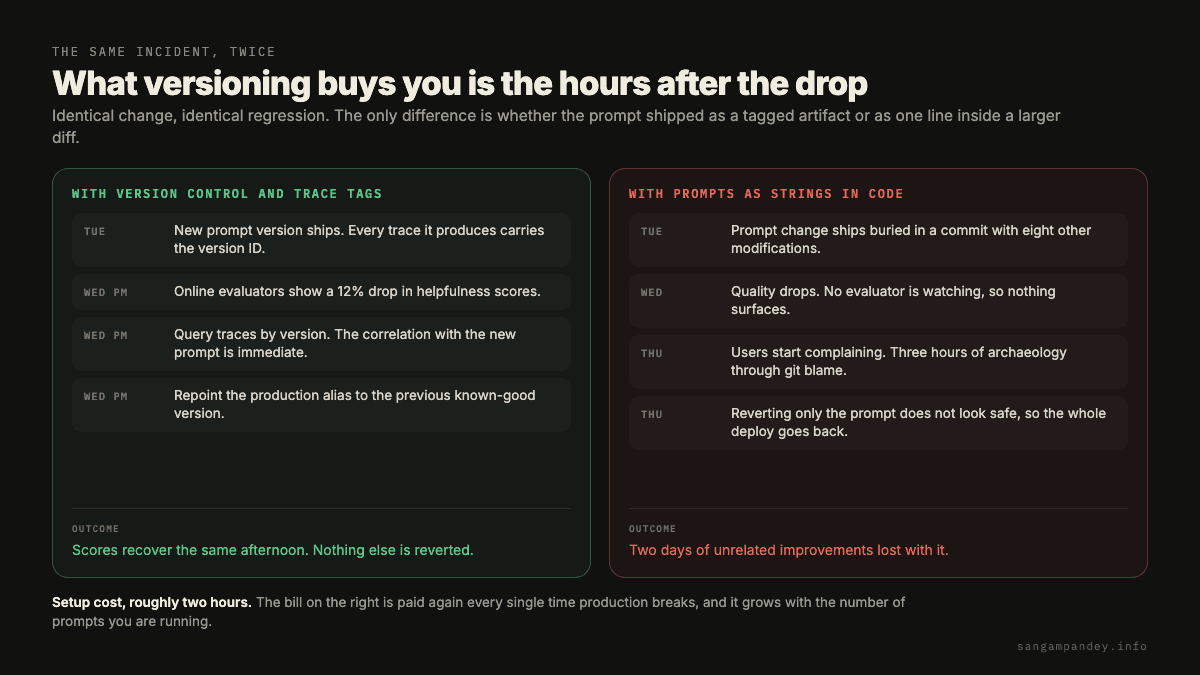
The tooling overhead of versioning prompts properly is maybe two hours of setup. The cost of not doing it is paid every time production breaks.
Where to Start#
Four concrete steps to get your prompts under version control this week:
-
Move every prompt to a file with metadata fields: version, author, date, model target, and eval score. Store these files in your repo alongside your code. Start with your highest-traffic prompts first.
-
Pick one tool and integrate it: Braintrust if you want native CI/CD integration and content-addressable IDs. Langfuse if you need self-hosting or strong OSS commitments. PromptLayer if you want the fastest path to adoption. Run your existing prompts through it immediately.
-
Add prompt version attributes to your trace spans: even before you have formal staging pipelines, this gives you the audit trail you need. When quality drops, you can at least ask the right questions.
-
Build your first eval gate on the staging promotion: define one metric that must pass before a prompt goes to production. One metric, one threshold. Automate the check. Expand from there once the pattern is established.
The underlying principle is not complicated. We version our code because we need to know what changed when things break. Our prompts are instructions to a system that makes decisions in production. They belong under the same discipline.
How I Would Run This in Production#
I would move every production prompt out of application code before trying to optimize it. Put it in a file with an owner, version, changelog, expected inputs, expected outputs, model constraints, and eval suite reference. The file is not just text. It is an operational artifact.
The second step is environment promotion. A prompt should move from draft to staging to production the same way code does. Drafts can be messy. Staging should run evals and shadow traffic. Production should be immutable except through a release process.
Tool definitions belong in the same discipline. A model sees tool schemas as part of the instruction surface. Changing a parameter description can change behavior. If you version prompts but mutate tool schemas freely, your audit trail is incomplete.
Every production trace should include prompt version, tool schema version, model version, and routing policy version. When quality changes, those four tags tell you where to look. Without them, post-incident analysis becomes a guessing exercise.
What I Would Measure#
The useful metrics are release frequency, rollback count, eval failure rate by prompt version, production failure rate by prompt version, and time to identify the changed artifact. You want prompt iteration to stay fast without becoming invisible.
I would keep a small release note with every prompt change. Not a long document. Just what changed, why, expected behavior, and the eval evidence. This helps future you understand whether a strange behavior was intentional or accidental.
The strongest signal is rollback confidence. If the team can roll back a prompt in minutes and explain exactly what behavior changed, versioning is working. If rollback requires redeploying the app and scanning old commits, it is not.
Where This Connects#
This post is one piece of the production agent lifecycle. The adjacent pieces matter because the failure usually does not stay inside one layer. A tracing problem becomes an eval problem. An eval problem becomes an ownership problem. A routing problem becomes a cost and security problem if nobody can see what changed.
- Offline Evals as a CI Gate
- Why Your Traces Are Lying to You
- The Static-First Prompt Architecture
- Model Routing for Practitioners
- 10 Lessons From Production AI Agents
If you are using this as a checklist, read those posts as dependencies rather than as optional background. The stack only becomes reliable when the evidence loop, the release loop, and the security loop all point at the same production behavior.
FAQ#
Why should prompts be stored outside code?#
Prompts change more often than application logic and directly affect model behavior. Storing them as versioned artifacts makes review, rollback, staging, and audit much easier.
Do tool schemas need versioning too?#
Yes. Tool names, descriptions, parameters, and examples influence model behavior. A small schema wording change can alter tool choice, so tool definitions should be versioned with prompts.
What metadata belongs in a prompt file?#
Include owner, version, model assumptions, input contract, output contract, linked eval suite, changelog, and rollback notes. That metadata makes the prompt operationally manageable.
How do traces relate to prompt versioning?#
Every trace should include the prompt version that produced the behavior. That lets you correlate failures, costs, and judge scores to the exact instruction artifact running in production.
Should every prompt change require approval?#
High-risk prompts should require review. Low-risk copy or formatting prompts can use lighter review if evals pass. The approval process should match the blast radius.
What is the simplest rollback setup?#
Use a stable production alias that points to a specific prompt version. Rollback means repointing the alias to the previous known-good version, not editing the prompt in place.
Implementation Review Checklist#
Before I would call this production-ready, I would ask five questions in the review. First, does the team know which artifact changed because of this lesson? A trace field, eval case, prompt file, routing rule, dashboard, or security policy should be visible in the repo or the runbook. If the only output is agreement, the lesson has not landed yet.
Second, can the team reproduce the failure mode in a lower environment? Production AI work gets messy when the only evidence is a screenshot, a Slack thread, or a vague user complaint. A reproducible example gives the team something concrete to test against after the fix.
Third, does the fix have an owner after the first merge? Most agent systems decay slowly. Datasets go stale, prompts drift, routing rules stop matching traffic, and permissions expand. The owner is the person who notices that drift before it becomes an incident.
Fourth, is rollback obvious? If a prompt, model, parser, evaluator, or security rule makes behavior worse, the team should know how to return to the last known-good version without rewriting the system under pressure.
Fifth, did the incident or improvement strengthen the loop? A good production process compounds. The trace becomes an eval. The eval becomes a gate. The gate becomes a safer release. That is the practical standard I would use for every idea in this series.
I would also ask whether the change makes the system easier to explain to a new teammate. Production AI stacks fail when the important behavior lives in someone s memory. If the reason for a prompt rule, routing threshold, eval example, or tool permission is not written down, the next person will eventually delete it while cleaning up what looks like accidental complexity.
The review should include one negative example. Show the input that used to fail, the trace or eval result that made the failure visible, and the current behavior after the change. This keeps the team grounded in evidence. It also stops the review from becoming abstract, which is where AI engineering discussions often drift.
For agent systems, I would check the cost impact and the quality impact together. A fix that improves quality by calling a frontier model three extra times may be correct for a regulated workflow and wrong for a low-margin support workflow. A cost reduction that removes useful context may look good for a week and then show up as worse user outcomes. The trade-off has to be explicit.
The last check is operational ownership. If the change creates a new dashboard, who looks at it? If it creates a new eval, who updates it? If it creates a new permission boundary, who approves exceptions? The difference between a strong production practice and a temporary cleanup is usually whether the maintenance path is obvious.
None of this needs to be heavy. A short pull request note, one linked trace, one eval case, and one owner are enough for many changes. The point is to leave a trail that future engineering work can build on. That is how AI systems become more reliable over time instead of slowly collecting unexplained rules.