A new model called Unlimited OCR showed up in my GitHub feed with 12,000 stars and a name that is basically the entire pitch. It promises to parse long documents in a single pass, dozens of pages at once, without slowing down. The team at BYU built it by fine-tuning DeepSeek OCR, and the demo is genuinely impressive.
Document parsing for AI agents is the process of converting raw files, PDFs, scans, and forms into structured text that a language model can reason over. It matters because the quality of extracted text sets a hard ceiling on what any downstream retrieval or generation step can achieve. What makes it distinct from general text extraction is that layout, reading order, and cross-page coherence are treated as first-class concerns, not incidental byproducts.
I spent a weekend going through the paper and the code. And I came away thinking: the model itself probably is not the right pick for most teams building RAG systems. But the problem it is solving, the actual mechanism it uses, and the trade-offs it reveals are some of the most useful mental models I have come across for thinking about document ingestion in production.
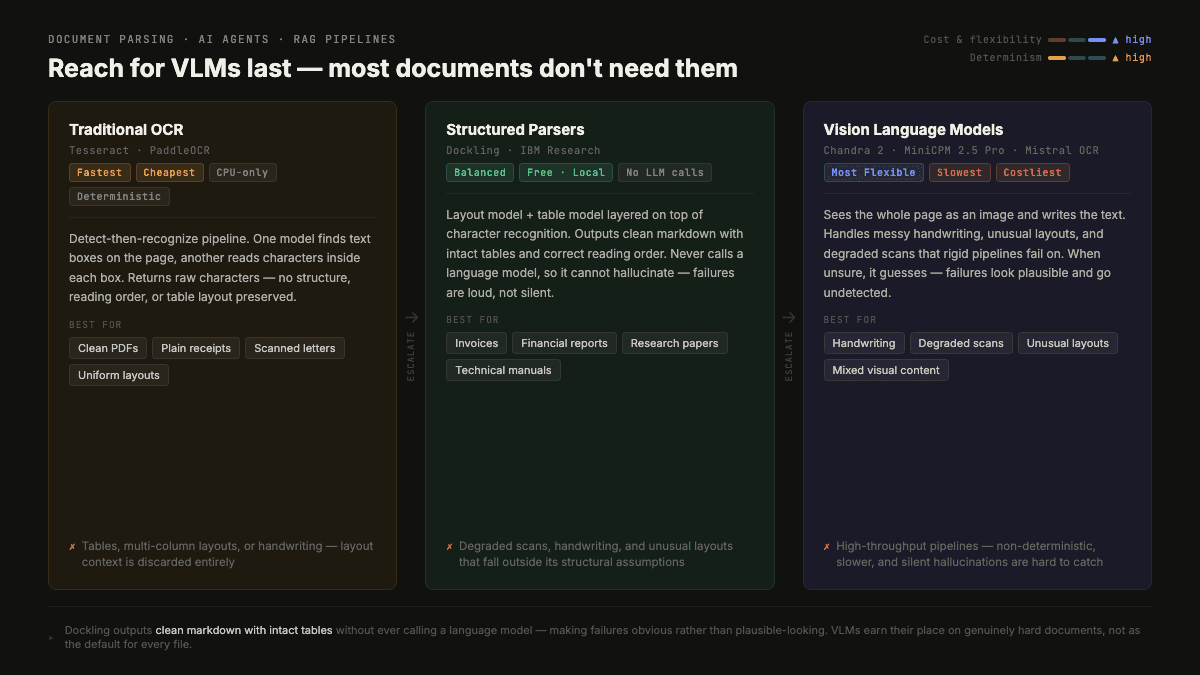
Table of Contents#
- The three-tier landscape
- The two problems nobody separates
- What Unlimited OCR actually does
- The honest catch list
- The decision framework
- When single-shot parsing actually makes sense
- What I would actually use
- How I Would Run This in Production
- What I Would Measure
- Where This Connects
- FAQ
So this is not really a model review. It is a breakdown of why document parsing keeps failing, why your chunking pipeline might be hiding a real problem, and how to make the right call when you are building something that needs to read documents reliably.
What are the three tiers of document parsing tools?#
Before you can evaluate any document parsing tool, you need a working mental model of the landscape. There are three distinct tiers, and they exist for different reasons.
Traditional OCR is things like Tesseract and PaddleOCR. These run a detect-then-recognize pipeline: one model finds the boxes of text on the page, another reads the characters inside each box. What comes back is raw text. The structure of the page, reading order, which text belongs to which column, where the tables are, all of that is gone. You get characters, not meaning.
The upside is that traditional OCR is fast, cheap, deterministic, and runs on a CPU. You get the same answer every time. For clean, simple pages like scanned letters or plain receipts, it is still the right call.
Structured document parsers sit in the middle. Dockling from IBM is the main example here. These tools add a layout model and a table model on top of the basic character recognition. They understand the structure of the page and can export actual markdown with intact tables and correct reading order, without ever touching a large language model. For structured documents like invoices, forms, financial reports, and research papers with complex layouts, this is usually the sweet spot.
Vision language models are at the top. A VLM looks at the whole page as an image and writes out the text, in roughly the same way it would describe a photograph. It can handle messy handwriting, unusual layouts, degraded scans, and documents that a rigid pipeline would misread or fail on entirely. The flexibility is real. So is the risk: when a VLM is unsure, it does not leave a blank. It guesses. And if you are not checking, you will not know.
That hierarchy matters because most developers jump to VLMs by default, assuming newer means better. For a lot of document processing workloads, that is wrong. VLMs are slower, more expensive, non-deterministic, and harder to validate. They earn their place on genuinely hard documents.
What are the two token problems nobody separates in document parsing?#
Here is where Unlimited OCR's paper has something genuinely useful to say.
When you process a document with a vision language model, there are two separate token problems. Most discussions treat them as one.
The input problem is how many tokens it costs just to get the page into the model so it can read it. A dense page of text might represent 2,000 tokens if you passed it as text. But if you render that page as an image and send the image, a VLM has to encode those pixels into vision tokens. Depending on the resolution, this can cost thousands of tokens per page, and the cost compounds quickly across a multi-page document.
DeepSeek OCR tackled this with something called optical compression. Instead of sending the raw image at full resolution, it compresses the image down to a much smaller set of vision tokens, using a specialized encoder trained to preserve text fidelity even at high compression ratios. At 10x compression, it retains around 97% accuracy. The effective input cost drops by a factor of 16 compared to uncompressed images. That is a real improvement. It is the reason DeepSeek OCR got attention when it launched.
The output problem is different, and this is the wall that Unlimited OCR is specifically trying to break through.
When a model generates text, it maintains a KV cache: a running memory of everything it has written so far. Every token the model generates adds to that cache. The more it writes, the bigger the cache gets. The bigger the cache, the more expensive each attention step becomes. The model slows down the further along it goes. For a long transcription, this is not a minor degradation. The paper is blunt about it: no existing model could parse even 10 pages in a single pass without the output side grinding to a halt.
I have written about KV cache dynamics in production agents before. The same mechanism that drives cost in agent loops drives slowdown in document parsing. The cache is the bottleneck in both cases.
So you have two separate problems: shrink the input, and tame the output. DeepSeek solved the input side. Unlimited OCR tried to solve both.
What does Unlimited OCR actually do?#
The solution BYU came up with is called Reference Sliding Window Attention, or RSWA. The name is a reasonable description of what it does.
Here is the intuition. Imagine you are copying out a book by hand. You keep your eyes on the source, the book you are copying from. You glance back at the last few words you wrote to keep yourself in flow. You do not reread everything you have already transcribed before writing the next word. That would take forever.
That is essentially RSWA. Every word the model writes can still attend to the full compressed image of the page, all those input vision tokens stay in context. That is the reference part. But when it looks back at the text it has already written, it only ever sees the last 128 words. The sliding window. Anything older than that drops out of memory.
The result is that the KV cache for the output does not grow unboundedly. Memory stays flat. Speed stays constant across pages. For documents longer than 6,000 image tokens, the paper reports up to 35% speedup compared to full-attention equivalents.
This is genuinely clever. It works because document transcription is a fundamentally local task. When you are transcribing page 23, you do not need to remember the exact wording from page 3. You need the current page and the last few words you wrote. The full-attention mechanism of a general language model is overkill for this specific job.
What are the real limitations of Unlimited OCR?#
I want to be straightforward here because the name "unlimited" sets an expectation the model does not fully meet.
The ceiling is 32,000 input tokens. That is not unlimited. The paper acknowledges this and lists expanding it as future work. With the base mode (256 tokens per page), you can fit maybe 120 pages. With the Gundam mode, which tiles high-resolution pages for better accuracy, you are looking at single-page processing only.
Gundam mode does not support full-document single-shot processing. The high-resolution tiled mode, which is what the demo shows, processes one page at a time. You have to batch them sequentially. The single-shot unlimited parsing only works in base mode, at lower resolution.
The benchmark position is not first place. The paper compares against an older baseline set and scores 93.9 on OmniDocBench. That looks strong. But Chandra 2, MiniCPM 2.5 Pro, GLM OCR, and BYU's own newer PaddleVL model all score higher on the same benchmark. If raw accuracy on a standard benchmark is your primary criterion, newer models beat it.
The chunking alternative handles most of the same problem. In almost every production RAG pipeline I have seen, documents get split into pages or sections and processed in parallel. Each page goes to a separate worker. Results get aggregated. This parallel approach sidesteps the KV cache output problem entirely, because each worker only transcribes one page. And parallel processing is faster in wall-clock time than sequential single-shot parsing, even if the single-shot approach is faster per-page than a naive alternative.
The one thing chunking does not solve is coherence across boundaries. Tables that span two pages get sliced. Sentences that run across a page break get separated. You need stitching logic to handle that, and stitching logic has its own failure modes.
How do you choose the right document parser for your pipeline?#
Given all of that, here is how I think about which tool to reach for in a document processing pipeline.
| Parser Type | Best For | When to Avoid |
|---|---|---|
| Traditional OCR (Tesseract, PaddleOCR) | Clean, uniform documents with simple layouts | Tables, multi-column layouts, or handwriting |
| Structured parser (Dockling) | Invoices, financial reports, research papers with complex tables | Degraded scans, handwriting, or unusual page layouts |
| Vision language model (Chandra 2, MiniCPM) | Handwriting, degraded scans, unusual or mixed layouts | High-throughput pipelines where cost and latency are constrained |
Clean, uniform documents with simple layouts: Traditional OCR. Tesseract or PaddleOCR. Faster, cheaper, deterministic. If you are processing thousands of similar documents and the structure is predictable, there is no reason to pay for a VLM.
Structured documents where layout carries meaning: Dockling or a similar structured parser. Invoices, financial reports, research papers, technical manuals. These tools understand tables and reading order without touching an LLM. The output quality for structured data is actually better than most VLMs for these formats because VLMs can misread table structures or lose column associations.
Messy or unusual documents: VLM. Handwriting, unusual layouts, degraded scans, mixed-content pages where a rigid pipeline would fail. This is where VLMs earn their cost. For local deployment, Chandra 2 or MiniCPM 2.5 Pro are worth evaluating. For cloud, Mistral OCR and various document intelligence APIs have gotten good.
Documents where page boundaries cause problems: This is the narrow but real use case for something like Unlimited OCR. If you are processing documents where content consistently spans page breaks in ways that chunking mangles, and you cannot fix this with overlap or better stitching logic, then single-shot sequential processing with RSWA-style attention might actually help. The same applies to translation tasks or audio transcripts where local context alone is not enough for coherent output.
That fourth category is smaller than the name "unlimited" implies. For most teams, Dockling handles the structured case well and a specialist VLM handles the complex case. The in-between is narrower than it sounds.
When does single-shot parsing actually make sense?#
Let me be more specific about the coherence argument, because it is the strongest one for sequential single-shot processing.
Tables that span multiple pages are the clearest example. If you split a PDF at page boundaries, a table that starts on page 4 and ends on page 5 gets sliced into two fragments. The header row is in one chunk. The data rows are in another. Any downstream extraction that tries to parse the table fails because neither chunk has the complete structure.
You can handle this with overlap, where you include the last N tokens of page 3 at the start of page 4. But overlap creates its own problem: you get duplicate content in your index, and deduplication adds complexity.
You can also handle it with layout detection that identifies table boundaries and rebuilds cross-page tables. Dockling actually does this reasonably well for standard formats. The stitching is built in.
What single-shot processing gives you is a simpler pipeline. No stitching layer. No overlap tuning. No deduplication pass. The document enters as a unit and comes out as a unit. For teams that want to minimize pipeline complexity at the cost of processing speed and some accuracy, this is a real trade-off, not a fake one.
The question is whether the coherence benefit justifies the latency cost. In my experience, the answer is usually no for large-scale ingestion where speed matters. It might be yes for smaller document sets where coherence errors are causing real downstream failures.
What would I actually use for production document parsing?#
For most AI builders working on RAG systems or document-grounded agents, my actual recommendation is Dockling as the default starting point.
Dockling is fast, it is free to run locally, it handles most standard document formats well, it outputs clean markdown with intact tables, and it does not hallucinate values. When it fails, it fails obviously. When a VLM fails on a document parsing task, the failure is often silent because the output looks plausible.
For documents where Dockling falls short, I would reach for a specialist cloud API or a locally hosted VLM. Which one depends on your privacy requirements, throughput needs, and accuracy benchmarks on your specific document types. You need to test on your actual documents, not just on OmniDocBench numbers.
Unlimited OCR is an interesting research contribution. The RSWA mechanism is genuinely novel. The paper is honest about the trade-offs. But for a team shipping a production RAG pipeline in 2026, it is not the tool I would start with.
The more useful thing the paper gives us is the two-problem framing: input tokens and output tokens are separate constraints, and solving one does not solve the other. That framing applies to any system where a model needs to process or generate large amounts of content sequentially. It is not just an OCR insight.
If you are building agentic systems that deal with long contexts, the same logic shows up everywhere. The KV cache dynamics that drive OCR degradation are the same dynamics that drive cost in long-running agent loops. Understanding where your context window is going, and whether the model is attending to everything in it or just a window of recent history, is one of those things that separates teams who understand their systems from teams who are surprised by their bills.
Document parsing is not a solved problem. It is a set of trade-offs that shifts depending on your document types, throughput requirements, accuracy needs, and pipeline complexity budget. The good news is the tools have gotten significantly better. The bad news is there is still no single right answer, and anyone who tells you otherwise is probably selling something with a catchy name.
How would I run document parsing in production?#
The way I would build this in a real RAG system is as a tiered parser, not a single model choice. Start with the cheapest deterministic parser that can preserve structure. Escalate only when the document actually needs a more flexible model. That keeps cost, latency, and hallucination risk under control.
The first branch is document classification. Is this a clean PDF, a scan, a form, a table-heavy report, handwriting, or a mixed document? The answer should determine the parsing path. Sending every file to a VLM is simple, but it makes the system slower and harder to verify.
The second branch is validation. For documents that drive decisions, compare extracted totals, dates, section headings, table row counts, and required fields against deterministic checks. A parser that looks fluent but changes a number is worse than a parser that fails loudly.
The third branch is fallback. If Dockling or a structured parser fails a validation check, escalate that page or section to a VLM. Do not reprocess the entire corpus with the expensive path unless coherence across pages is the actual failure mode.
What would I measure in a document parsing pipeline?#
The metrics I would track are parse success rate, validation failure rate, average cost per page, latency per document, hallucinated-field rate, table reconstruction accuracy, and downstream retrieval success. Parsing quality is only useful if retrieval and answer quality improve.
I would sample outputs manually at the beginning. Document parsing has too many silent errors to trust aggregate numbers immediately. Look at pages with dense tables, tiny footnotes, multi-column layouts, diagrams, and scanned annotations.
Finally, measure where chunking fails. If cross-page tables, split sentences, or section headers are the main source of retrieval errors, single-shot parsing or better stitching may be worth the complexity. If those are rare, parallel page parsing is probably the better default.
Where does document parsing fit in the production agent stack?#
This post is one piece of the production agent lifecycle. The adjacent pieces matter because the failure usually does not stay inside one layer. A tracing problem becomes an eval problem. An eval problem becomes an ownership problem. A routing problem becomes a cost and security problem if nobody can see what changed.
- The 10x Cost Difference Nobody Talks About
- Why Your RAG Pipeline Fails in Production
- Graphify Hit 450K Downloads in 26 Days. Here is Why the Economics of AI Coding Just Changed.
- Offline Evals as a CI Gate
- 10 Lessons From Production AI Agents
If you are using this as a checklist, read those posts as dependencies rather than as optional background. The stack only becomes reliable when the evidence loop, the release loop, and the security loop all point at the same production behavior.
FAQ#
What is the safest default parser for RAG ingestion?#
For clean structured documents, a deterministic structured parser is usually the safest default. It is faster, cheaper, easier to validate, and less likely to hallucinate than a vision language model.
When should I use a vision language model for parsing?#
Use a VLM for handwriting, degraded scans, unusual layouts, mixed visual content, or documents where deterministic parsers consistently fail validation. VLMs should be a targeted escalation path, not the default for every file.
Why does single-shot parsing matter?#
Single-shot parsing can preserve cross-page coherence because the model sees the document as a unit. It matters when page-level chunking breaks tables, headings, or sentences that span boundaries.
What is the downside of single-shot parsing?#
It is usually slower, harder to parallelize, and often limited by context or output generation constraints. For high-throughput ingestion, page-level parallel parsing plus stitching is often more practical.
How do I validate parser output?#
Check required fields, totals, dates, table row counts, section order, citation anchors, and downstream retrieval quality. Manual review of sampled pages is still important for silent errors.
How does parsing connect to KV cache behavior?#
Long document transcription grows the output-side KV cache as the model writes tokens. That can slow generation and increase cost. Techniques like sliding-window attention try to keep that output cache bounded.