A colleague showed me their flight booking agent last month. It was polished. Clean UI, solid tool integrations, a retrieval pipeline pulling from airline APIs. They typed "Find me a flight from Denver to New York next Friday" and the agent confidently returned three options. Good prices. Reasonable layovers. Every single one departed in 2024.
Eval-driven development is a testing methodology for AI agents in which you define correct behavior across retrieval quality, tool parameter accuracy, and end-to-end task completion before writing any agent code. It matters because agents can pass every unit test and still produce factually wrong outputs at production scale. Unlike traditional test-driven development, which verifies deterministic function behavior, eval-driven development accounts for non-determinism and semantic correctness requirements that type systems and schema validators cannot catch.
The year was 2025.
The agent had passed every unit test in the suite. The retrieval pipeline returned relevant results. The API calls completed without errors. The response format was valid JSON. By every traditional testing metric, the agent was working perfectly. It just happened to be searching for flights in the wrong year.
This is what eval-driven development for AI agents is actually about. Not whether the code runs. Not whether the API returns 200. Whether the agent, given a real user intent, produces a result that is correct in the full, messy, context-dependent sense of the word.
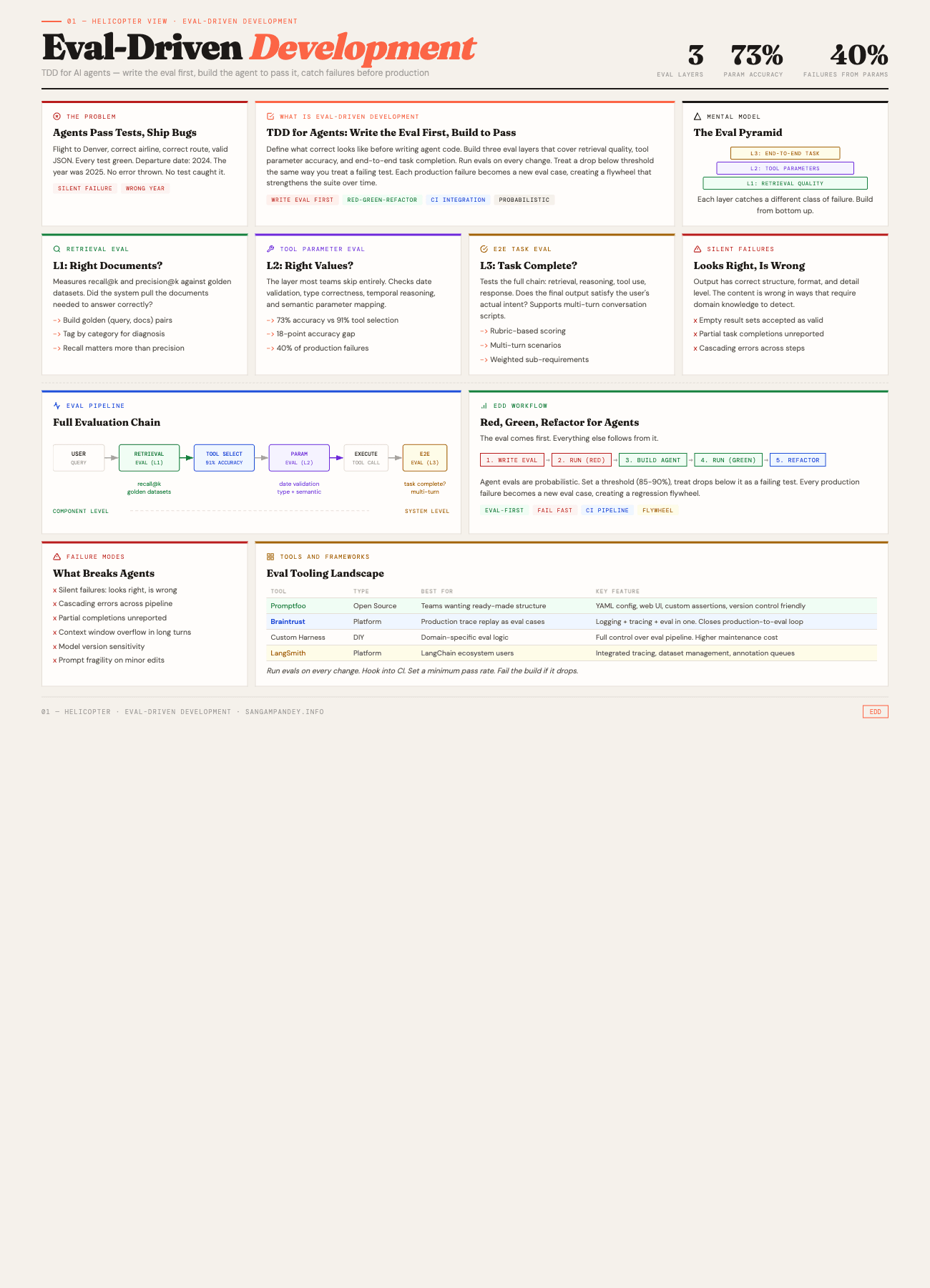
For a visual overview of the eval pyramid and workflow, see the Eval-Driven Development infographic.
Table of Contents#
- What is eval-driven development?
- The Denver flight that never was
- Why do traditional tests fail for agents?
- How do retrieval quality evals work?
- How do tool parameter evals work?
- What are end-to-end task evals?
- How to build an eval suite from scratch
- The eval-driven development workflow
- What are the common failure modes?
- Production monitoring versus offline evals
- FAQ
What Is Eval-Driven Development?#
Eval-driven development is TDD for AI agents. You write the evaluation first, defining what correct behavior looks like across retrieval, tool parameters, and end-to-end task completion. Then you build the agent to pass those evals. In the projects I have worked on, tool selection accuracy typically lands around 91%, but parameter accuracy tends to hover around 73%. That 18-point gap explains why roughly 40% of production failures in the agents I have built trace back to wrong parameter values.
The following table compares the three eval layers across key dimensions.
| Dimension | L1: Retrieval Eval | L2: Tool Parameter Eval | L3: E2E Task Eval |
|---|---|---|---|
| What It Tests | Document relevance for a query | Correctness of tool call values | Full task completion and output quality |
| Catches | Wrong documents, missing context, embedding drift | Wrong dates, bad types, semantic mismatches | Silent failures, partial completions, cascading errors |
| Misses | Downstream reasoning errors | Whether the task actually succeeded | Root cause of component-level failures |
| Latency | Fast (retrieval only) | Fast (single tool call check) | Slow (full agent execution per case) |
| Implementation Effort | Medium (golden datasets required) | Low (parameter checkers are simple functions) | High (multi-turn scripts, rubric scoring) |
Key takeaway: All three layers are necessary. Retrieval evals without parameter evals miss the 18-point accuracy gap. Parameter evals without E2E evals miss cascading failures. Build from the bottom of the pyramid up.
Why Did the Denver Flight Agent Return Results from the Wrong Year?#
Let me unpack what actually went wrong with the flight booking agent, because the failure mode is more instructive than it first appears.
The user said "next Friday." The agent needed to resolve that to a concrete date. To do that, it needed to know what today's date was. The system prompt included a current_date field, but the retrieval pipeline had been fine-tuned on training data from 2024. When the model constructed the API call to the flight search endpoint, it generated a departure_date parameter of 2024-11-15 instead of 2025-11-14. The month and day-of-week were correct. The year was off by one.
Here is the thing that makes this so painful. The flight search API happily accepted the request. It returned valid results. Historical flight data exists for dates in the past, so the API did not throw an error. The agent formatted the results beautifully. The user saw three flights with real airline names, real route information, and real prices. Nothing about the response screamed "this is wrong" unless you noticed the date.
A standard integration test would check: did the API call succeed? Yes. Did the response contain flight data? Yes. Did the agent format it correctly? Yes. All green. Ship it.
The bug lived in a single parameter value. And finding it required a kind of testing that most agent developers have not built yet.
I wrote about testing AI agent skills a few weeks ago, covering Minko Gechev's Skill Eval framework. That post focused on whether agents follow instructions reliably. This post goes deeper. It is about testing whether agents produce correct outputs across the full execution chain, from retrieval to tool calls to final results. Three layers of evaluation, each catching a different class of failure.
Key takeaway: The Denver flight bug was not a code error. It was a parameter value error that no unit test, integration test, or schema validation would catch. This is the class of failure that eval-driven development exists to prevent.
Why Do Traditional Tests Fail for Agents?#
If you come from a software engineering background, your instinct is to write unit tests. Test the function. Mock the dependencies. Assert on the output. This works beautifully for deterministic code. It falls apart for agents in three specific ways.
Non-determinism is the default, not the exception. The same prompt, the same model, the same temperature setting can produce different outputs on consecutive runs. This is not a bug you can fix. It is a fundamental property of how language models work. A test that passes 8 out of 10 times is not a flaky test in the traditional sense. It is telling you something real about the reliability of your agent, and you need evaluation infrastructure that can capture and reason about that variance.
Multi-step execution creates combinatorial state spaces. An agent that retrieves documents, reasons about them, selects a tool, constructs parameters, calls the tool, interprets the result, and formulates a response has at least six points where things can go wrong. Testing each step in isolation misses the interactions. The retrieval might be perfect, but the model might misinterpret what it retrieved. The parameter construction might be correct for the retrieved context, but the retrieved context might be wrong for the user's actual intent. These cross-step failures are where most production bugs live.
Tool interactions have semantic correctness requirements that go beyond type checking. A function call with the right types and the right shape can still be semantically wrong. The flight date example is one instance. Another common one: a database query agent that constructs a valid SQL query with correct syntax but queries the wrong table, or applies a filter that technically works but returns a misleading subset of data. Type systems do not catch these errors. Schema validation does not catch them. Only semantic evaluation, checking whether the output means what the user intended, catches them.
This is why I keep coming back to the idea that agentic engineering requires its own discipline. The five pillars I outlined in that post, context management, tool design, error recovery, observability, and evaluation, are all connected. But evaluation is the one that tells you whether the other four are actually working.
Key takeaway: Traditional tests verify that code runs. Agent evals verify that outputs are correct in the full, context-dependent sense. Non-determinism, multi-step execution, and semantic correctness requirements make standard unit testing insufficient.
How Do Retrieval Quality Evals Work?#
The first layer of evaluation targets the retrieval pipeline. Before the agent reasons, before it calls tools, it needs to pull the right information. If retrieval fails, everything downstream is built on a bad foundation.
What you are measuring#
Retrieval evals answer a simple question: given a user query, did the system retrieve the documents (or data or context) that contain the information needed to answer correctly?
Two metrics dominate this space.
Recall@k measures what fraction of the relevant documents appear in the top k results. If there are 5 relevant documents in your corpus and your retrieval returns 3 of them in the top 10, your recall@10 is 0.6. This tells you whether you are missing important information.
Precision@k measures what fraction of the top k results are actually relevant. If you return 10 documents and only 3 are relevant, your precision@10 is 0.3. This tells you whether you are drowning the model in noise.
For most agent applications, recall matters more than precision. A model can usually ignore irrelevant context. It cannot reason about context it never received.
Building golden datasets#
You need a ground truth to evaluate against. This means building golden datasets: curated sets of (query, relevant_documents) pairs where a human has verified which documents are relevant.
This is tedious work. There is no shortcut that fully replaces it. But there are ways to make it less painful.
Start with production logs. If your agent is already running, look at the queries users actually send. Sample 50 to 100 representative queries. For each one, manually identify which documents in your corpus should be retrieved. That is your initial golden set.
Augment with synthetic variations. Take each real query and generate 3 to 5 paraphrases. "Book me a flight to Denver next Friday" becomes "I need to fly to Denver, what is available on Friday?" and "Denver flights for this coming Friday, please." Your retrieval should handle all of these equally well.
Include adversarial cases. Queries that are ambiguous. Queries that use different terminology than your documents. Queries where the relevant information is spread across multiple documents. These edge cases are where retrieval pipelines actually fail, and they need to be in your evaluation set.
A practical retrieval eval#
Here is a minimal retrieval eval setup. Nothing fancy. Just the structure that works.
# retrieval_eval.py
from dataclasses import dataclass

@dataclass
class RetrievalCase:
    query: str
    expected_doc_ids: list[str]
    tags: list[str]  # e.g., ["temporal", "multi-hop", "ambiguous"]

def recall_at_k(retrieved: list[str], expected: list[str], k: int) -> float:
    top_k = set(retrieved[:k])
    relevant = set(expected)
    if not relevant:
        return 1.0
    return len(top_k & relevant) / len(relevant)

def run_retrieval_eval(
    retriever,
    cases: list[RetrievalCase],
    k: int = 10
) -> dict:
    results = []
    for case in cases:
        retrieved = retriever.search(case.query, top_k=k)
        retrieved_ids = [doc.id for doc in retrieved]
        score = recall_at_k(retrieved_ids, case.expected_doc_ids, k)
        results.append({
            "query": case.query,
            "score": score,
            "tags": case.tags,
            "retrieved": retrieved_ids,
            "expected": case.expected_doc_ids
        })

    scores = [r["score"] for r in results]
    return {
        "mean_recall": sum(scores) / len(scores),
        "min_recall": min(scores),
        "results": results
    }
The tags field matters more than it looks. When your mean recall drops, you want to know whether it dropped across the board or specifically on temporal queries, or multi-hop queries, or queries using informal language. Tags let you diagnose the failure, not just detect it.
When retrieval evals catch real bugs#
I have seen retrieval evals catch problems that would have taken weeks to surface in production. An embedding model update that improved average similarity scores but degraded recall on short queries. A chunking strategy change that split critical information across two chunks, so neither chunk alone was sufficient. A metadata filter that silently excluded documents updated in the last 24 hours because of a timezone mismatch.
None of these would show up in a unit test. All of them showed up immediately in a retrieval eval suite with 80 golden cases.
Key takeaway: Retrieval evals with 80 golden cases and tagged categories will catch embedding drift, chunking regressions, and metadata filter bugs before they reach production. Start with production logs, augment with synthetic variations, and include adversarial edge cases.
How Do Tool Parameter Evals Work?#
This is where the Denver flight bug lived. The retrieval was fine. The tool selection was correct. The parameter values were wrong.
The tool parameter eval is the one most teams skip entirely. Tool parameter evals sit between retrieval evals and end-to-end evals. They check whether the agent constructs correct tool calls given the context it has. From what I have seen, agents hit the ~91% mark on tool selection but only ~73% on parameter accuracy. That 18-point accuracy gap is where roughly ~40% of production failures originate. This is the layer where I have seen the most production incidents.
What you are checking#
For each tool call the agent makes, you want to verify several things.
Parameter completeness. Did the agent provide all required parameters? A flight search without a departure date should fail validation, but many tool implementations have defaults that silently fill in missing values with something wrong.
Type correctness. Are dates formatted as dates? Are numbers actually numbers? Are enum values from the allowed set? This is basic but important. Models sometimes generate "next Friday" as a date string instead of "2025-11-14."
Temporal reasoning. This is the big one. Anything involving dates, times, durations, or relative time references ("next week," "last quarter," "the past 30 days") is a minefield. The model needs to resolve relative references against the current date, handle timezone conversions, and understand calendar concepts like business days versus calendar days.
Semantic correctness. Even if all the types are right, are the values semantically correct for what the user asked? A query for "cheap flights" should probably set a price sort parameter. A query for "direct flights" should set a stops filter to zero. These are not type errors. They are intent-to-parameter mapping errors.
Building tool parameter eval cases#
The structure is straightforward. For each eval case, you specify a user query, the context the agent will have, the expected tool call, and the expected parameters.
@dataclass
class ToolParamCase:
    user_query: str
    context: dict           # system prompt, current date, retrieved docs
    expected_tool: str      # which tool should be called
    expected_params: dict   # what parameters it should have
    param_checkers: dict    # per-parameter validation functions

# Example: the Denver flight case
denver_case = ToolParamCase(
    user_query="Find me a flight from Denver to New York next Friday",
    context={
        "current_date": "2025-11-09",
        "current_day": "Sunday"
    },
    expected_tool="search_flights",
    expected_params={
        "origin": "DEN",
        "destination": ["JFK", "LGA", "EWR"],  # any NYC airport
        "departure_date": "2025-11-14",
    },
    param_checkers={
        "departure_date": lambda d: d.startswith("2025"),
        "origin": lambda o: o == "DEN",
    }
)
The param_checkers field is where you encode the semantic checks. The departure date checker does not require an exact match. It checks whether the year is correct. This is a deliberate design choice. For some parameters, exact matching is right. For others, you want to verify a property (correct year, correct airport code format, price within a reasonable range) rather than an exact value.
Temporal reasoning deserves its own test suite#
I am not exaggerating when I say that 40 percent of the tool parameter bugs I have encountered involve temporal reasoning. Here is a non-exhaustive list of things that go wrong.
The model uses the training data cutoff date instead of the current date. The model resolves "next Friday" relative to the wrong reference date. The model does not account for timezone differences when the user is in one timezone and the API expects another. The model interprets "last week" as 7 days ago instead of the previous calendar week. The model generates dates in MM/DD/YYYY format when the API expects YYYY-MM-DD. The model gets confused by year boundaries, so "next month" in December becomes January of the current year instead of January of the next year.
Each of these is a separate eval case. And each of them has bitten a production agent that I know of personally.
temporal_cases = [
    # Year boundary
    ToolParamCase(
        user_query="Schedule a meeting for next month",
        context={"current_date": "2025-12-28"},
        expected_tool="create_event",
        expected_params={"month": "2026-01"},
        param_checkers={"month": lambda m: m.startswith("2026")}
    ),
    # Relative day resolution
    ToolParamCase(
        user_query="What were sales last Monday?",
        context={"current_date": "2025-11-12", "current_day": "Wednesday"},
        expected_tool="query_sales",
        expected_params={"date": "2025-11-10"},
        param_checkers={"date": lambda d: d == "2025-11-10"}
    ),
    # Timezone-aware
    ToolParamCase(
        user_query="Book a 9am slot tomorrow (I am in Tokyo)",
        context={"current_date": "2025-11-12", "user_tz": "Asia/Tokyo"},
        expected_tool="book_slot",
        expected_params={"datetime_utc": "2025-11-13T00:00:00Z"},
        param_checkers={
            "datetime_utc": lambda dt: "2025-11-13" in dt or "2025-11-12" in dt
        }
    ),
]
If you build nothing else from this post, build a temporal reasoning eval suite for your agent. It will pay for itself within a week.
Key takeaway: The ~73% parameter accuracy versus ~91% tool selection accuracy reveals an 18-point gap. Roughly ~40% of production failures trace to wrong parameter values. If you build nothing else from this post, build a temporal reasoning eval suite for your agent.
What Are End-to-End Task Evals?#
The first two layers catch component-level failures. End-to-end task evals check whether the whole system, retrieval, reasoning, tool use, response generation, produces a result that actually satisfies the user's intent.
This is the hardest layer to build. It is also the most valuable.
What end-to-end means for agents#
An end-to-end eval gives the agent a complete task and checks whether the final output is correct. Not whether each intermediate step was correct, though you can log those for debugging. Whether the final answer, the thing the user would see, is right.
For the flight booking agent, an end-to-end eval would be: given the query "Find me a flight from Denver to New York next Friday," does the agent return flights that depart on the correct date, from the correct origin, to the correct destination? Not whether the retrieval was good. Not whether the parameters were right. Whether the flights are right.
Multi-turn scenarios#
Real agent interactions are rarely single-turn. A user asks a question. The agent responds. The user clarifies or follows up. The agent adjusts.
Multi-turn evals capture this. They define a conversation script with expected behaviors at each turn.
@dataclass
class ConversationTurn:
    user_message: str
    expected_behavior: dict  # what the agent should do
    assertions: list         # checks on the agent's response

multi_turn_case = [
    ConversationTurn(
        user_message="Find flights from Denver to New York next Friday",
        expected_behavior={"tool": "search_flights"},
        assertions=[
            lambda r: "2025-11-14" in str(r) or "November 14" in str(r),
            lambda r: "DEN" in str(r) or "Denver" in str(r),
        ]
    ),
    ConversationTurn(
        user_message="Actually, make that Saturday instead",
        expected_behavior={"tool": "search_flights"},
        assertions=[
            lambda r: "2025-11-15" in str(r) or "November 15" in str(r),
            # Should remember Denver and New York from context
            lambda r: "DEN" in str(r) or "Denver" in str(r),
        ]
    ),
    ConversationTurn(
        user_message="What about a return flight on Sunday?",
        expected_behavior={"tool": "search_flights"},
        assertions=[
            lambda r: "2025-11-16" in str(r),
            # Should flip origin and destination
            lambda r: any(nyc in str(r) for nyc in ["JFK", "LGA", "EWR"]),
        ]
    ),
]
The third turn is the tricky one. "A return flight on Sunday" requires the agent to understand that origin and destination should be swapped, that "Sunday" refers to the Sunday after the outbound Saturday, and that it should retain the user's preferences from previous turns. This is the kind of reasoning that breaks silently when you change your system prompt or swap models.
Task completion scoring#
Not every eval is binary pass or fail. For complex tasks, a rubric-based score captures partial success.
def score_flight_result(result, expected):
    score = 0.0
    total = 0.0

    # Correct date (most important)
    total += 0.4
    if result.departure_date == expected.departure_date:
        score += 0.4

    # Correct origin
    total += 0.2
    if result.origin == expected.origin:
        score += 0.2

    # Correct destination
    total += 0.2
    if result.destination in expected.valid_destinations:
        score += 0.2

    # Reasonable results (not empty, not error)
    total += 0.1
    if result.flights and len(result.flights) > 0:
        score += 0.1

    # No hallucinated information
    total += 0.1
    if not result.contains_fabricated_data:
        score += 0.1

    return score / total
The weights tell you what matters most. For a flight booking agent, getting the date wrong is the worst failure. Getting the airport wrong is bad but less catastrophic. Returning an empty result set is annoying but recoverable. Hallucinating fake flights is dangerous.
This connects directly to how I think about building multi-agent systems. In a multi-agent setup, each agent's output becomes input for the next agent. An end-to-end eval at each handoff point prevents cascading failures.
Key takeaway: End-to-end evals are the hardest to build and the most valuable. They catch silent failures, cascading errors, and partial completions that component-level tests miss entirely. Use rubric-based scoring with weighted sub-requirements rather than binary pass/fail.
How Do You Build an Eval Suite from Scratch?#
If you are starting from zero, here is how I would approach building an eval suite. This is roughly the process I have followed across three different agent projects.
Step one: collect failure cases#
Before you write a single eval, spend a week collecting failures. Use the agent yourself. Have your team use it. Record every case where the output was wrong, incomplete, or misleading.
You will notice patterns. Maybe temporal reasoning fails consistently. Maybe the agent picks the wrong tool when the query is ambiguous. Maybe retrieval degrades on queries with technical jargon. These patterns tell you which eval layer to prioritize.
Step two: build the golden dataset#
Take your failure cases and turn them into eval cases. For each one, specify the input (user query plus context), the expected output, and the checks that determine correctness.
Start small. Twenty cases per layer is enough to catch the most common failures. You can expand later.
Step three: choose your tooling#
Three options I have used, each with different trade-offs.
Promptfoo is an open-source evaluation framework that supports custom assertions, multiple providers, and a nice web UI for reviewing results. It is good for teams that want a ready-made structure and do not want to build evaluation infrastructure from scratch. Configuration is YAML-based, which makes it easy to version control your eval cases alongside your code.
Braintrust is a platform that combines evaluation with logging and tracing. The advantage is that you can trace a production request through every step (retrieval, reasoning, tool calls, response) and then replay it as an eval case. This closes the loop between production monitoring and offline evaluation, which I will discuss more in the monitoring section.
Langfuse is another strong option, especially if you want open-source observability alongside your evals. It provides tracing, prompt management, and evaluation scoring in a single platform, and it integrates well with most LLM frameworks.
Arize Phoenix focuses on LLM observability and evaluation with a strong emphasis on tracing and debugging. If your priority is understanding why an eval failed, not just that it failed, Phoenix gives you detailed trace visualization that makes root cause analysis much faster.
Custom eval harness. Sometimes you need something specific enough that a framework gets in the way. The code examples in this post are all from custom eval harnesses. The advantage is full control. The disadvantage is that you are maintaining evaluation infrastructure on top of everything else. I covered the engineering patterns for this kind of harness in building long-running agent harnesses, and many of those patterns apply to eval harnesses as well.
Step four: run evals on every change#
This is where the discipline matters. Evals that only run when someone remembers to run them are almost as bad as having no evals at all.
Hook your eval suite into your CI pipeline. Every pull request that touches agent code, prompts, retrieval configuration, or tool definitions should trigger the eval suite. Set a minimum pass rate, something like 85 percent to start, and fail the build if the pass rate drops below it.
This is not free. Running evals costs money because you are making LLM calls. Running evals takes time because LLM calls are slow. Budget for it. The cost of running evals is a fraction of the cost of shipping a broken agent to production.
Step five: expand from failures#
Every production failure becomes a new eval case. This is the flywheel. The eval suite gets better over time because every bug you find makes the suite more comprehensive.
Keep a runbook. When a user reports a problem, diagnose which layer the failure occurred at (retrieval, tool parameters, or end-to-end), create a minimal eval case that reproduces it, verify the eval fails, fix the agent, and verify the eval passes. This is TDD, just applied to agent behavior instead of function outputs.
Key takeaway: Start with 20 cases per layer (60 total). Choose tooling that matches your team: Promptfoo for open-source structure, Braintrust for production trace replay, or a custom harness for full control. Hook evals into CI with a minimum 85% pass rate.
What Is the Eval-Driven Development Workflow?#
Here is the workflow, stated plainly. It is TDD for agents.
-
Define the task. What should the agent do? Be specific. "Book a flight" is not specific enough. "Given a natural language query with a relative date reference, search for flights on the correct absolute date from the correct origin to the correct destination" is specific enough.
-
Write the eval first. Before you write any agent code, write the eval cases that define what correct looks like. Include happy paths, edge cases, and known failure modes. This forces you to think precisely about what the agent should do before you think about how it should do it.
-
Run the eval. Watch it fail. Your eval should fail because the agent does not exist yet, or does not handle the case correctly. This is the red phase.
-
Build or improve the agent. Now write the agent code, the prompt, the retrieval pipeline, the tool definitions. Make the eval pass.
-
Run the eval again. Watch it pass. Green.
-
Refactor. Clean up. Improve. But run the eval after every change to make sure nothing regressed.
This is not theoretical. This is how I build agents now. The eval comes first. Everything else follows from it.
The analogy to test-driven development is direct and intentional. In traditional TDD, you write a test that specifies the expected behavior, you write code to make it pass, and you refactor with the safety net of the test. In eval-driven development, you write an eval that specifies the expected agent behavior, you build the agent to make it pass, and you iterate with the safety net of the eval.
The difference is that agent evals are probabilistic. You will not get 100 percent pass rates. You set a threshold, say 90 percent on your core eval suite, and you treat drops below that threshold the same way you would treat a failing test. Something broke. Fix it before shipping.
Key takeaway: The eval comes first. Write the eval, watch it fail (RED), build the agent to pass (GREEN), refactor with confidence. Agent evals are probabilistic, so set a threshold (90% for high-stakes, 80% for research) and treat drops below it as build failures.
What Are the Common Failure Modes?#
After building eval suites for several agent projects, I have a catalog of failure modes that keep appearing. Here are the ones that cause the most damage.
Silent failures#
The agent produces output that looks correct but is not. The Denver flight example is the canonical case. The output has the right structure, the right format, the right level of detail. It is just wrong in a way that requires domain knowledge or careful reading to detect.
Silent failures are the reason end-to-end evals exist. Component-level tests will not catch them because each component is working correctly in isolation. The failure is in the composition.
How to catch them: Build eval cases with specific assertions on the content of the output, not just its structure. Check that dates are correct, that names match, that numbers are in the right range. Be paranoid about anything that involves resolving references or performing calculations.
Cascading errors#
A small error in an early step propagates through the rest of the pipeline and causes a much larger error in the final output.
The classic example: the retrieval pipeline returns a slightly wrong document. The model reasons about that document and draws a conclusion. It uses that conclusion to construct a tool call. The tool call returns a result based on the wrong conclusion. The final answer is confidently wrong, and the reasoning chain looks plausible at every step.
How to catch them: Log intermediate outputs during eval runs. When an end-to-end eval fails, inspect the full trace to identify where the error originated. Then add a component-level eval at that point.
Partial completions#
The agent completes some parts of a complex task but silently drops others.
"Book a flight from Denver to New York, window seat, and send me a confirmation email." The agent books the flight but does not request a window seat or send the email. It does not tell the user that it skipped those steps. It just responds as if the task is done.
How to catch them: Decompose complex tasks into a checklist of sub-requirements. Score each sub-requirement independently. A task with 5 requirements where the agent completes 3 should score 0.6, not 1.0.
Context window overflow#
The agent works perfectly on short interactions but degrades on long conversations because earlier context gets pushed out of the window or compressed.
How to catch them: Include multi-turn evals with 10 or more turns. Check that information from early turns is still available and correctly used in later turns. This is especially important for agents that maintain state across a conversation.
Model version sensitivity#
An eval suite that passes at 92 percent on one model version drops to 74 percent on a newer version. Or the opposite: you upgrade the model and everything improves except one critical category of tasks.
How to catch them: Run your eval suite across model versions. Track results per model per eval category. This gives you data to make informed decisions about when and whether to upgrade.
Prompt fragility#
A minor change to the system prompt, reordering two paragraphs, changing "you must" to "you should," removing an example, causes unexpected behavior changes.
How to catch them: Run the full eval suite after every prompt change, no matter how small. Treat your system prompt as code. Because for agents, it is code.
Key takeaway: Six failure modes dominate agent production issues: silent failures, cascading errors, partial completions, context window overflow, model version sensitivity, and prompt fragility. At least 30% of eval cases should cover adversarial and edge-case scenarios.
How Does Production Monitoring Differ from Offline Evals?#
Offline evals and production monitoring are complementary. Neither replaces the other.
Offline evals run on a fixed dataset with known expected outputs. They tell you whether your agent handles cases you have already thought of. They run before deployment. They are your test suite.
Production monitoring watches the agent in the real world, handling queries you have not thought of. It tells you about failure modes you did not anticipate. It runs after deployment. It is your observability layer.
What to monitor in production#
Tool call success rates. What percentage of tool calls complete without errors? A sudden drop means something changed, either in your tool implementations, in the model's behavior, or in the data the model is working with.
Parameter distribution drift. Track the distribution of parameter values over time. If your flight booking agent suddenly starts generating departure dates in 2024, you want to know about it before users report it. Statistical process control charts work well here. You are not looking for individual bad values. You are looking for distributional shifts.
User satisfaction signals. Did the user accept the result? Did they retry the query? Did they escalate to a human? These are noisy signals individually, but in aggregate they tell you whether agent quality is improving or degrading.
Latency per step. Retrieval latency, model inference latency, tool call latency. Performance degradation is a failure mode too. An agent that takes 30 seconds to book a flight is functionally broken even if it gets the right answer.
Token usage patterns. Sudden increases in token usage for similar queries can indicate the model is struggling, generating longer reasoning chains, or getting caught in loops. Track this as a proxy for model confidence.
Closing the loop#
The most valuable thing you can do with production monitoring data is feed it back into your offline eval suite.
When you see a failure in production, capture the full trace: user query, retrieved context, tool calls, parameters, responses. Turn that trace into an eval case. Add it to your suite. Now you have a regression test for a real-world failure, and your eval suite covers a case it did not cover before.
Over time, this creates a flywheel. Production failures become eval cases. Eval cases prevent future failures. The eval suite becomes a living document of every way your agent has ever failed, and a guarantee that it will not fail that way again.
This is the same philosophy I described in my post on agentic engineering's five pillars. Evaluation is not a phase. It is a continuous practice.
Key takeaway: Offline evals and production monitoring are complementary. Offline evals catch known failure modes before deployment. Production monitoring catches unknown failure modes after deployment. Feed production failures back into the eval suite to create a continuous improvement flywheel.
How Do You Put Eval-Driven Development Together?#
If I were starting an agent project today, here is the order I would build things.
First, the eval suite skeleton. Define the three layers. Write 10 cases per layer, mostly drawn from the specific failure modes you expect for your domain. Flight booking? Heavy on temporal reasoning. Customer support? Heavy on retrieval quality. Data analysis? Heavy on tool parameter accuracy.
Second, the agent itself. Build it to pass the eval suite. Resist the urge to build the agent first and write evals later. By the time you are writing evals after the fact, you have already internalized how the agent works, and you end up writing evals that test for what the agent does rather than what it should do. Those are very different things.
Third, the CI integration. Evals run on every change. No exceptions. The pass rate threshold goes in the build configuration, not in a document that says "please remember to run evals."
Fourth, the production monitoring pipeline. Capture traces. Detect anomalies. Feed failures back into the eval suite.
This is not a small investment. It is a significant amount of infrastructure. But every team I have seen skip it has ended up building it eventually, usually after a production incident that was embarrassing enough to force the issue. Build it from the start. Your future self will be grateful.
FAQ#
How many eval cases do I need to get started?#
Start with 20 to 30 cases per layer, so 60 to 90 total across retrieval, tool parameters, and end-to-end. Focus on the cases that represent your most common user queries and your most likely failure modes. You can expand from there. I have seen mature eval suites with 500 or more cases, but starting with 60 good ones is better than starting with 300 mediocre ones.
What pass rate threshold should I set?#
This depends on the stakes. For a flight booking agent where incorrect results waste user money, I would set 90 percent or higher. For a research assistant where approximate answers are acceptable, 80 percent might be fine. Start conservative and adjust based on what you learn. The important thing is to have a threshold at all, because without one, evals become informational rather than actionable.
How do I handle the cost of running evals?#
LLM-based evals cost money. A suite of 100 cases at roughly $0.05 per case costs $5 per run. If you run it on every PR, that might be $50 to $100 per week for an active team. This is not trivial, but it is a small fraction of the cost of shipping a broken agent. You can reduce costs by using cheaper models for eval grading, caching retrieval results, and only running the full suite on main branch merges while running a targeted subset on PRs.
Can I use an LLM to grade eval results instead of writing custom assertions?#
Yes, and for some eval types it is the only practical approach. End-to-end evals often require judgment calls that are hard to express as code assertions. "Is this response helpful and accurate?" is easier to grade with an LLM than with regex patterns. But LLM graders introduce their own non-determinism. Use them for semantic judgment, not for factual verification. If you can check something deterministically (is the date correct? is the airport code valid?), do it deterministically. Reserve LLM grading for the aspects that genuinely require reasoning.
How is this different from traditional A/B testing?#
A/B testing compares two versions of a system using live traffic and measures aggregate outcomes. Evals compare a system's behavior against known-correct expected outputs using curated test cases. They serve different purposes. Evals tell you whether the system is correct. A/B tests tell you whether the system is better than the alternative. You need both. Run evals before deployment to catch regressions. Run A/B tests after deployment to measure impact. Evals are your tests. A/B tests are your experiments.
What is the biggest mistake teams make with agent evals?#
Testing the happy path only. I see this constantly. The eval suite has 50 cases and all of them are well-formed, unambiguous queries with clear expected outputs. That is testing whether the agent works when everything goes right. The real value of evals is testing whether the agent fails gracefully when things go wrong: ambiguous queries, conflicting context, edge cases in date handling, malformed input, missing data. At least 30 percent of your eval cases should be adversarial or edge-case scenarios.
How often should I update my eval suite?#
Every time you find a production failure, add an eval case. Every time you add a new feature or tool, add eval cases for it. Every time you change your prompts, run the existing suite and consider whether new cases are needed. In practice, a healthy eval suite grows by 5 to 10 cases per week for an actively developed agent. If your eval suite has not changed in a month, either your agent is perfect (unlikely) or you are not paying attention to production behavior.